A lot of the friction blamed on dental software isn’t really about the software; it’s about who does what. Eaglesoft is flexible. Team members can work across both the clinical and administrative sides, and there’s often more than one way to complete the same task.
That flexibility is a strength, but without clear roles it can leave everyone assuming someone else is handling the important steps. This article is about turning that flexibility into a smooth, predictable workflow by getting clear on who owns what.
- Eaglesoft lets the whole team work across clinical and admin tasks, which is great until ownership is unclear.
- “When it’s everybody’s job, it’s nobody’s job”: unassigned tasks quietly fall through the cracks.
- Decide who owns each recurring step, like keeping charts and treatment plans clean.
- Clarity is kindness: clear expectations help your team succeed, not just comply.
- Cross-train a backup for every key task so a sick day doesn’t derail the office.
- The owner sets the ground rules; the team executes them consistently.
- Practice by Numbers (PbN) helps track that the agreed-on tasks are actually getting done.
Flexibility Is a Strength (and a Trap)
Because Eaglesoft gives the whole team access to both clinical and administrative tasks, and often provides multiple ways to accomplish the same thing, team members have room to work in the way that makes sense for their role. That flexibility can make the system easier to adapt to different workflows, and it gives team members the freedom to take ownership of different responsibilities without feeling boxed in.
But that same flexibility can create gaps when roles are not clearly defined. A recurring task may fall into a gray area where everyone assumes someone else is handling it, even though no one has been clearly assigned to own it. Over time, those small gaps can lead to inconsistent processes, missed follow-ups, or work that gets pushed from one person to another. The answer is not to restrict how the team uses Eaglesoft or remove its flexibility. It is to make responsibilities clear so everyone knows what they own, what they are responsible for completing, and where to go when a task crosses roles.
The “Everybody’s Job” Trap
There’s a well-worn truth in dental teams: “When a task is everybody’s job, it becomes nobody’s job.” Chart cleanup is the classic example. Rejecting declined treatment options, finishing notes, and keeping records accurate all matter enormously, but if no one specifically owns those steps, they get skipped until they become a painful cleanup project.
The solution is simple to say and powerful in practice: assign an owner to each recurring task.
Assign Ownership to the Right Person
Ownership should match ability, not just availability. Take chart cleanup again: the person who rejects a declined treatment option should understand what they’re rejecting clinically, so this often isn’t a job to hand to whoever happens to be free.
Walk through your recurring tasks and decide, explicitly, who owns each one and when it happens in the visit.
Recurring Task | Questions to Settle |
|---|---|
Keeping treatment plans clean | Who rejects declined options, and at what point in the visit? |
Outstanding claims | Who reviews aging claims and follows up on the stalled ones? |
Posting procedures and checkout | Who walks the patient out and confirms the right amount is collected? |
Working the schedule | Who owns filling openings and keeping the day on track? |
You don’t have to get every answer perfect on the first try. The point is that the questions are answered on purpose, not left to chance.
👉 See How to Handle Insurance and Collections Well in Eaglesoft
Clarity Is Kindness
Clear expectations aren’t bureaucracy. They show your team that you value their time. When expectations stay vague, people fill gaps with assumptions. Those assumptions can create confusion, missed steps, or inconsistent results.
For example, “You’re in charge of the schedule” can mean many things. One person may focus on filling cancellations and open slots. Another may focus on confirming appointments and managing patient requests. Neither approach may match what you intended.
Instead, define what the role includes and what success looks like. List the specific tasks the person owns each day. Explain the order they should follow and the standard they should meet. Make clear when they should ask for help or escalate an issue.
Clear expectations give people a practical path to success. They also make accountability easier and more consistent. When people know exactly what you expect, they can meet those expectations. Vague expectations create avoidable problems. Clear expectations give good people the structure they need to succeed.
👉 Eaglesoft Block Scheduling: The Underused Way to Protect the Doctor’s Day
Cross-Train a Backup for Every Key Task
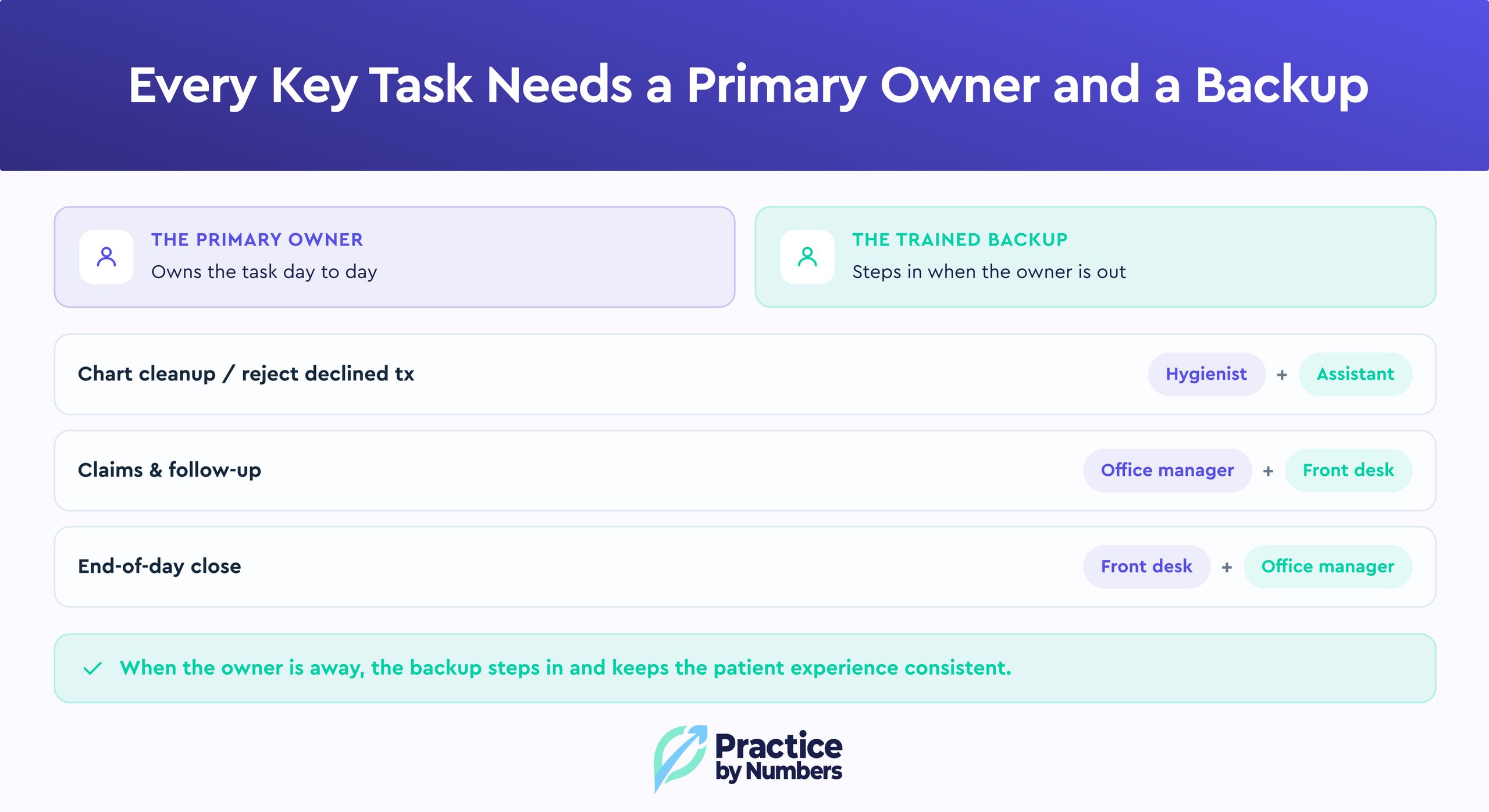
Even clear ownership cannot prevent illness, vacations, or unexpected absences. That makes backup coverage essential for every key task. A simple way to frame this uses the “mom and nanny” model. One person owns the task, while another person learns the same routine. The backup should know the steps, timing, tools, and expected standard. They should also know where to find any resources they need.
When the primary owner is out, the backup can step in without starting from scratch. The team can keep the day moving without unnecessary confusion. Patients can receive the same consistent experience regardless of who handles the task. Cross-training gives your team more flexibility and reduces dependence on one person. It helps build a team that can keep working when plans change.
Someone Has to Set the Rules
Finally, clear workflows need a decision-maker. In most practices, that’s the owner or lead provider, and it’s worth being intentional about it. If you don’t set the ground rules for how your team works, the team will set them for you, and the result may not fit how you want to practice.
Decide how you want the day to run, communicate it clearly, and hold the team to it kindly and consistently. A workflow that fits the practice lets everyone do their best work, which is ultimately what gives patients the best experience.
How Practice by Numbers Fits Alongside Eaglesoft
Clear roles work best when you can see whether the agreed-on tasks are actually happening. Practice by Numbers connects to Eaglesoft and brings the practice’s activity into one live view (scheduling, production, collections, recall, and outstanding treatment) plus task management to keep responsibilities visible.
Eaglesoft stays the system your team works in. PbN adds the shared visibility that helps everyone see how the practice is doing and confirm that nothing important is slipping through the cracks.