Almost every scheduling headache in a dental office comes down to the same thing: the day doesn’t flow smoothly. The doctor gets booked for a crown prep and a new-patient exam at the same time, hygiene checks pile up, and everyone spends the morning apologizing for running behind. On a special edition of the Practice Pulse podcast, host Dr. Aditi Agarwal, Co-Founder of Practice by Numbers, sat down with Eaglesoft expert Shelly VanEpps, a dental practice coach and COO of All-Star Dental Academy with 25 years in the operatory as an assistant, office manager, and treatment coordinator, to break down where practices lose the most time in Eaglesoft.
Her answer was block scheduling, a feature that’s built into Eaglesoft but being used by far fewer teams than it should be. This article explains what block scheduling is in Eaglesoft, how the X’s and dashes actually direct the doctor’s time, and how to set it up so your day runs the way you designed it.
- Eaglesoft’s OnSchedule includes “ideal day” templates. Block scheduling reserves time for specific appointment types.
- The whole point of a block is that it stays put. You decide the ideal day once, and the schedule stops sliding around.
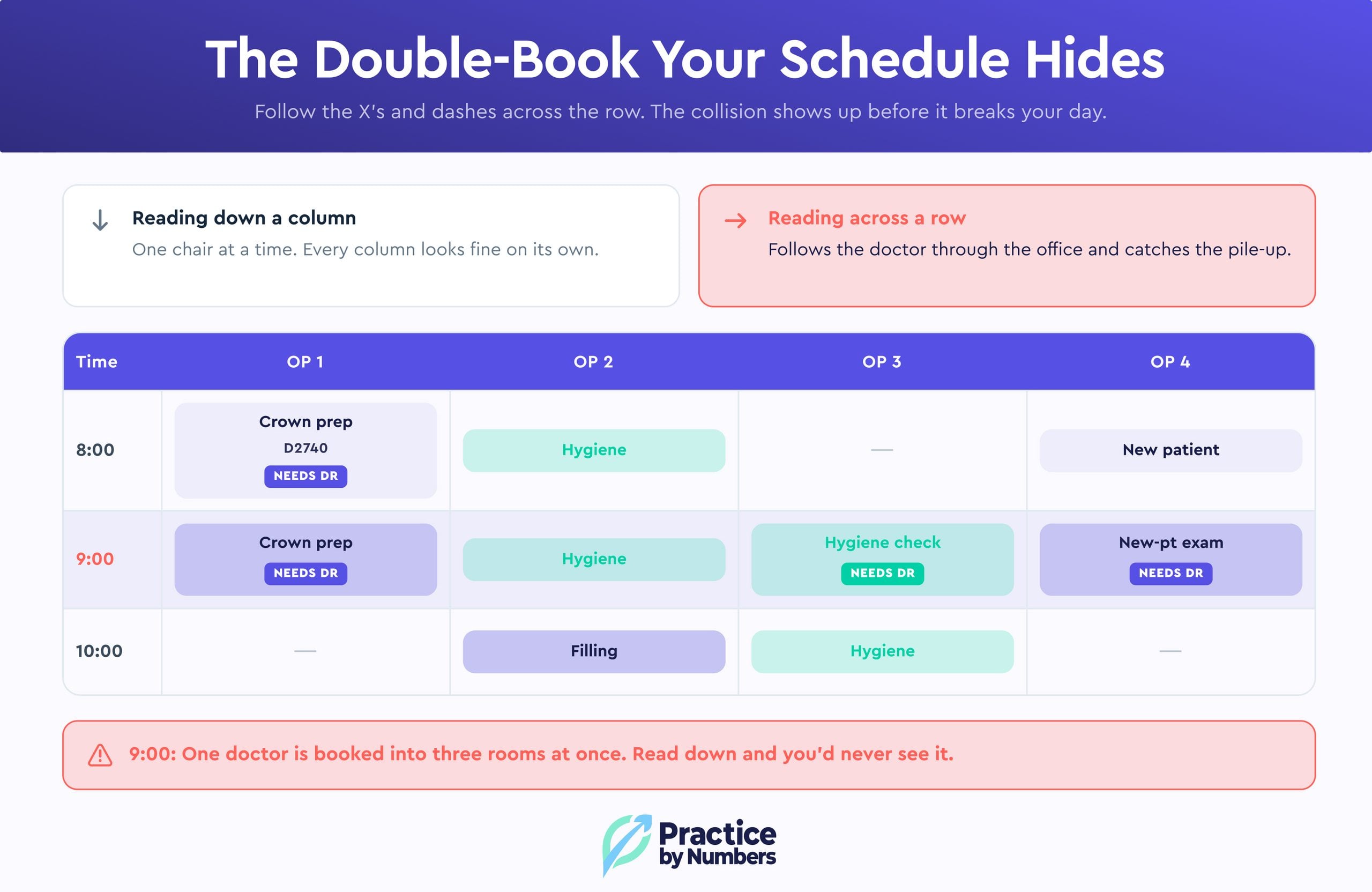
- The X’s and dashes show where each provider’s time is, so the team can read the schedule across, not just up and down.
- Reading across is how you stop double-booking the doctor into two chairs at once.
- Shelly calls this the biggest gap between what Eaglesoft can do and what teams actually use.
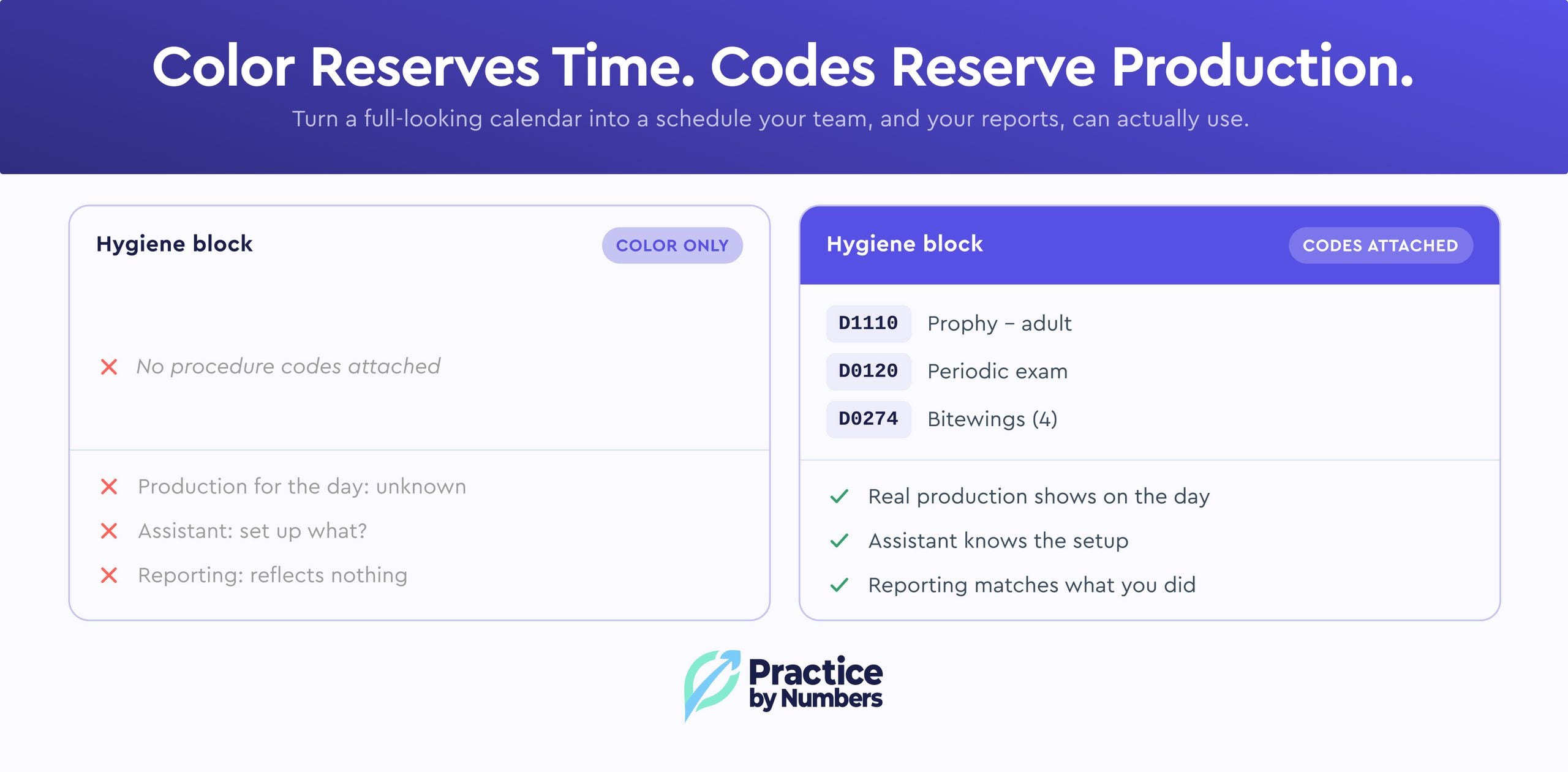
- Attach real procedure codes to blocks so the schedule tells you what’s happening, not just that a chair is full.
- Practice by Numbers reads your Eaglesoft schedule so you can see how well the day is booked against goal.
What Block Scheduling Is In Eaglesoft
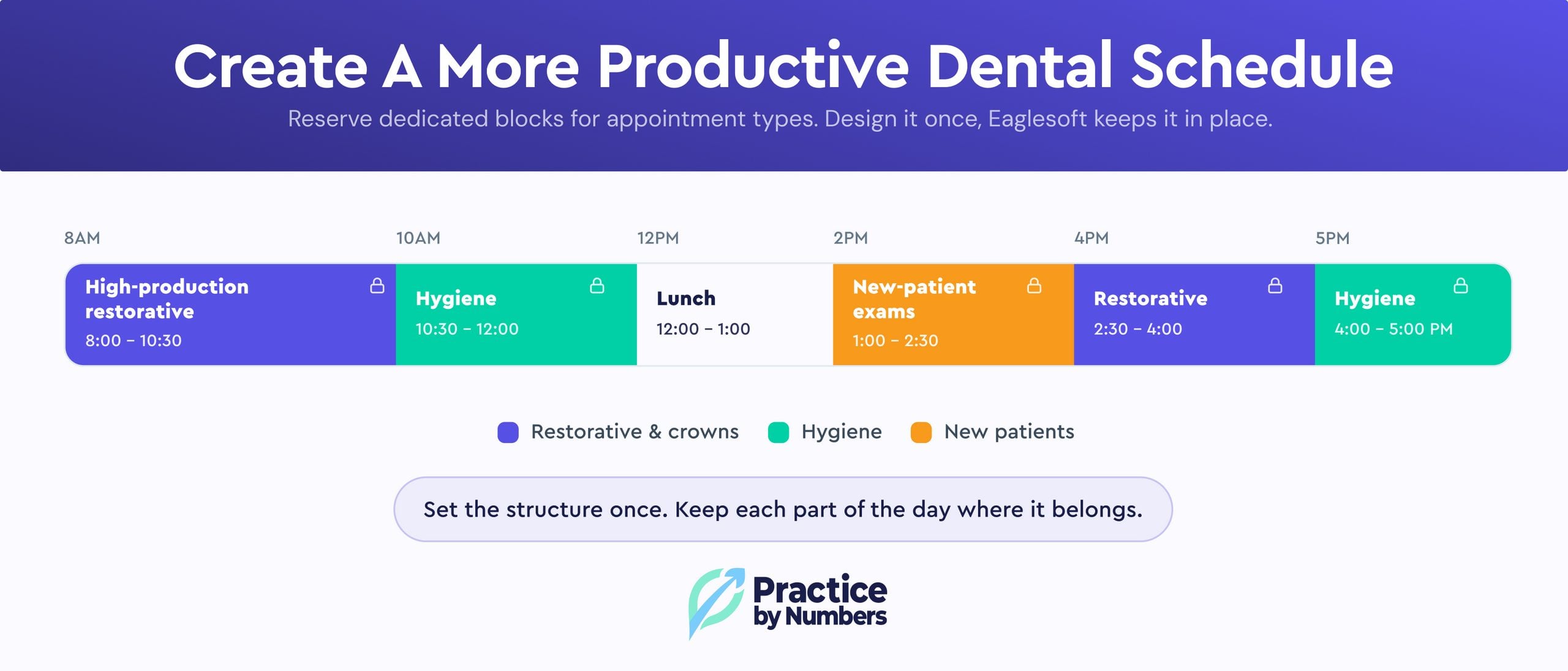
Block scheduling, what Eaglesoft calls an ideal day template inside OnSchedule, reserves parts of the day for the kinds of appointments you want in them. You build a template in OnSchedule, assign appointment types to specific time slots, and then apply that template to a chair for the days of the week it should run. Higher-production procedures get the times that suit them, hygiene and new patients get theirs, and the schedule shows those reserved areas in color so the team can see the plan at a glance.
The idea is simple: design the day you want, then let the software hold that shape. Shelly loves how firmly Eaglesoft holds it.
That immovability is a feature, not a limitation. A block you can drag anywhere isn’t really protecting anything.
👉Here’s How Eaglesoft Adapts to Specialized and Evolving Dentistry
Decide the Day Once, Then Stop Negotiating
The value of a locked block shows up in the moments when the front desk is under pressure. A patient wants “anytime Tuesday,” a slot looks open, and it’s tempting to slide a crown into the time you’d reserved for new patients. Block scheduling takes that decision off the table because you already made it, calmly, in advance, when you were thinking about the whole week instead of one phone call.
“Once you decide this is the day and why we want crowns in the morning and new patients at this time, there’s no sliding, there’s no movement. It’s just perfect.”
– Shelly VanEpps
The result is a day that flows the way you intended, with production landing where you planned it instead of clustering by accident. It also protects the appointment mix a healthy practice needs: room for new patients, steady hygiene, and the restorative time that pays the bills.
👉 See How to Handle Insurance and Collections Well in Eaglesoft
The X’s and Dashes: How to Direct the Doctor’s Time
This is the part Shelly says teams miss most. Asked where the biggest gap is between what Eaglesoft can do and what practices actually use, she pointed straight at the scheduling markers that show provider time.
“I kind of feel like it’s those X’s and dashes and really paying attention to the doctor and how to direct the doctor time when scheduling.”
– Shelly VanEpps
Here’s why it matters. Most teams read the schedule vertically, straight down a single column for one chair, and book whatever looks open. But the doctor moves between rooms all day. If you only read down one column, you can’t see that the 9:00 crown prep in Operatory 1 collides with the 9:00 exam the schedule just handed the doctor in Operatory 3. The markers that show where the provider is supposed to be let you read the day across the whole office, so you place the doctor once and let assistants and hygiene work around that.
“You can go straight up and down a column, but you also have to be able to read across.”
– Shelly VanEpps
She described the classic symptom she hears from dentists: the team books a root canal at the same moment the doctor is supposed to be prepping a crown in one room, checking a hygiene patient in another, and doing a new-patient exam in a third. The provider can’t be in four places at once, so the day breaks. Reading across, following the provider’s time through the office, is what prevents it.
Why So Few Teams Use It
If block scheduling is so useful, why is it underused? Shelly’s honest answer is that most teams were never shown how to build it.
“I don’t know that everybody is using that consistently or really have a grasp on how to use it or how to set it up.”
– Shelly VanEpps
She’s walked teams through it live over screen share, laying out the ideal day together and showing where the production time should sit. The setup is a one-time investment: a template built once guides the schedule for months. If your team has never built an Ideal Day in OnSchedule, that’s a high-value hour with a trainer or your Patterson support resources.
Attach Codes to the Block, Not Just a Color
A block reserves time, but the appointment inside it still needs to say what’s actually happening. Van Epps regularly finds appointments that are just an empty hour, “hygiene block” or “restorative”, with no procedure codes attached.
When the codes are on the appointment, the schedule tells you the real production for the day, the assistant knows what to set up, and your reporting reflects what you’re actually doing. When they’re missing, the schedule looks full but tells you nothing, and “the doctor will figure it out” becomes the plan. Attaching codes is the small habit that turns a colored block into a usable roadmap.
Book the Ideal Day Toward Your Goal
Block scheduling and production goals work together. Once the ideal day is holding its shape, you can look at the day and the month at a glance and see whether you’re booked toward goal or drifting, a huge month followed by a quiet one. The point isn’t to chase money for its own sake; it’s that a business has to cover its expenses, and consistency is what makes that predictable. A well-built ideal day makes scheduling to goal the default instead of a scramble.
👉 Learn How You Can Keep Your Eaglesoft Practice Secure and Compliant
How Practice by Numbers Fits Alongside Eaglesoft
Once your ideal day is built in Eaglesoft, the next question is how well you’re filling it. Practice by Numbers connects to Eaglesoft and reads your schedule and production data, so you can see open time, how the day and month are booking against goal, and where the gaps are, all in one live view your whole team can check at the morning huddle.
Eaglesoft stays the system that runs the schedule; PbN adds the visibility on top so the ideal day you designed actually gets filled.
👉 Eaglesoft + Practice by Numbers: A Practical Guide to Building an Efficient Dental Practice