Insurance and collections in Eaglesoft is where most front desks spend the day, and where time and money are won or lost. Claims, eligibility, estimates, and collections all run through the practice management system, and small habits add up to big differences in cash flow.
Eaglesoft gives teams a solid set of tools for the money side of the practice. A few good practices around those tools keep claims clean, patients informed, and accounts receivable low.
- Insurance workflows are where front desks gain or lose the most time.
- Verify insurance eligibility and benefits before every appointment to reduce claim denials and unexpected patient balances.
- Stay on a current, supported Eaglesoft version so you can submit the latest ADA claim form.
- Track production, collections, and accounts receivable, and enter data consistently so the numbers are trustworthy.
- Record benefit details in the patient record so the whole team can answer coverage questions.
- Practice by Numbers connects with Eaglesoft to bring production, collections, and A/R into one dashboard for easier financial visibility.
Insurance Is Where the Front Desk Wins or Loses Time
A smooth insurance workflow keeps the schedule productive and the practice paid. A messy one creates rework, delays, and awkward conversations with patients about surprise balances.
The difference usually comes down to setup and habits: how plans and fee schedules are entered, how eligibility is checked, and how consistently the team follows the same steps. Eaglesoft supports all of this well when a practice uses it the way it was built to work.
Verify Eligibility and Benefits Before the Visit
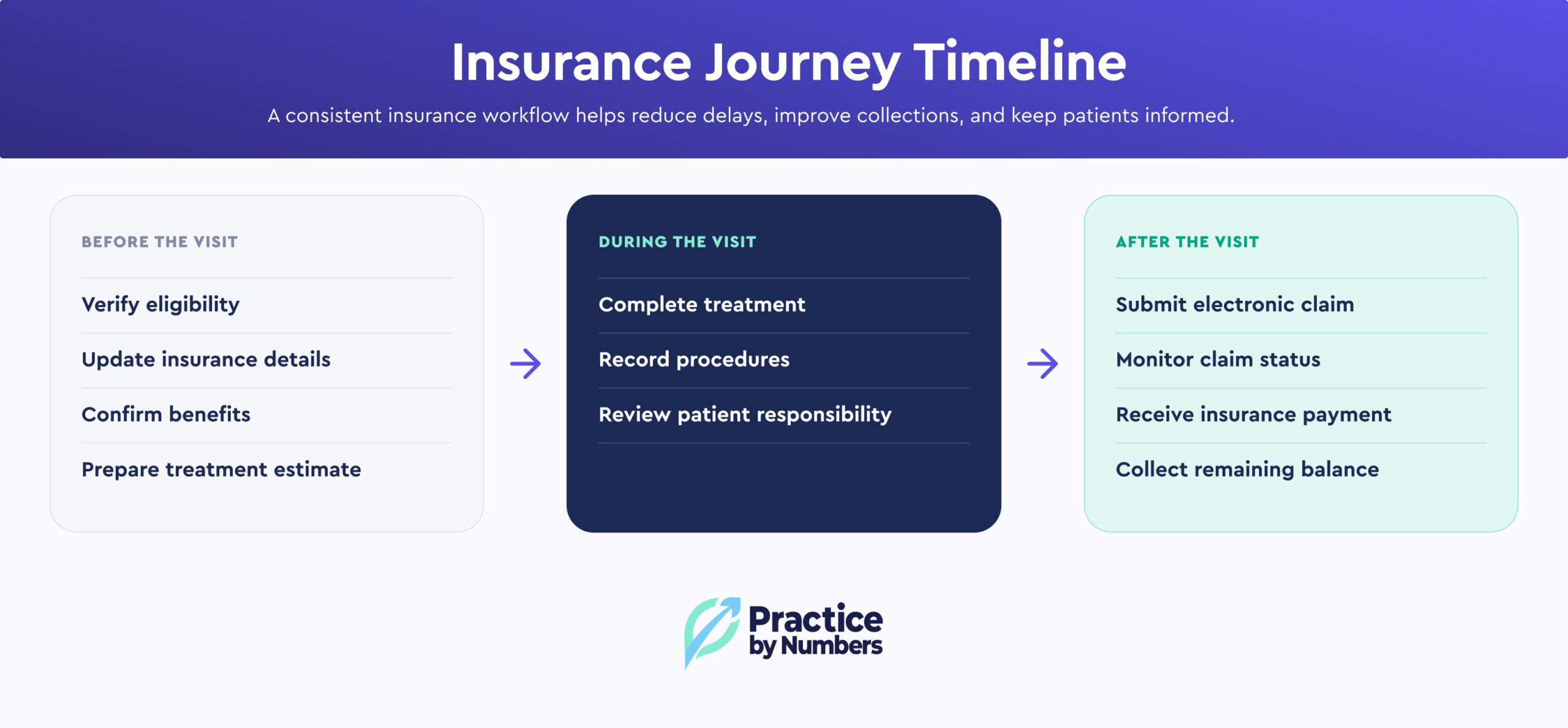
The cleanest claims start before the patient arrives. Confirming coverage and benefits ahead of time prevents most denials and billing surprises.
In Eaglesoft, that means keeping insurance plans, coverage details, and fee schedules current, and checking eligibility ahead of the appointment. Accurate estimates at the front desk build patient trust and make same-day collection far easier. The more complete your plan setup, the more reliable your treatment estimates become.
👉 See How Dental Practice Analytics Improve Revenue, Retention, and Operational Control
Keep Claims Clean and Current With ADA Forms
Clean claims get paid faster, and staying current matters. The ADA updates its claim form periodically, and running a current, supported version of Eaglesoft keeps you compatible with the latest form so submissions go through without friction.
Eaglesoft supports electronic claims and attachments, which shorten the path from treatment to payment. Attach the right documentation, submit electronically, and track claim status so nothing sits unworked. Keeping the software current is one of the simplest ways to avoid claim headaches.
Track Collections and Accounts Receivable
Insurance workflows don’t end once a claim has been submitted. Financial performance depends just as much on how consistently outstanding balances are monitored and collected.
Eaglesoft provides practices with tools such as patient ledgers, insurance estimates, statements, and financial reporting to help teams follow balances through to payment. Regularly reviewing these reports allows practices to identify aging accounts before they become larger collection challenges.
Many successful practices keep a close eye on three key financial metrics:
Metric | Why it matters |
|---|---|
Production | Measures the value of treatment completed |
Collections | Shows how much revenue has actually been received |
Accounts Receivable | Identifies outstanding balances still waiting to be collected |
These reports become significantly more valuable when every team member follows consistent data entry practices. Reliable reporting makes it easier to understand whether production is growing, collections are keeping pace, and A/R remains under control.
Keep Your Team Informed About Patient Benefits
A strong front desk keeps benefit details close at hand: how many cleanings a year a plan covers, frequency limits, and remaining benefits. Recording those details in the patient record and notes means anyone on the team can answer a coverage question without guessing.
Building that habit into how your team uses Eaglesoft keeps patients informed and keeps the schedule moving. It’s a small discipline that pays off every day at the front desk.
👉 See Cloud-Based vs On-Premise Dental Software: Which One Wins?
How Practice by Numbers Fits Alongside Eaglesoft
Once your insurance and collections workflow is running consistently, the next step is understanding what the financial data is telling you.
Practice by Numbers connects with Eaglesoft to bring production, collections, and accounts receivable into a single view. Instead of reviewing multiple reports individually, practices can monitor key financial metrics from one dashboard while continuing to use Eaglesoft as their primary practice management system.
Eaglesoft remains the system used to manage daily insurance and billing activities, while Practice by Numbers helps practices analyze performance trends and monitor financial health over time.