Someone calls in sick, a patient cancels, and suddenly there’s a gap in the day. That open time is production the practice needs, and it doesn’t come back on its own. On the special edition of the Practice Pulse podcast, Dr. Aditi Agarwal, Co-Founder of Practice by Numbers, sat down with Eaglesoft expert Shelly VanEpps, COO of All-Star Dental Academy, to walk through two tools built right into Eaglesoft that can turn a last-minute hole into a booked appointment: the Quick Fill list and the Money Finder.
Both tools are free, powerful, and work far better when you keep them clean. Shelly ran a practice on Eaglesoft for years and now coaches dental teams as COO of All-Star Dental Academy. Here’s how she uses these two tools, plus a pro tip that can save a lot of headaches at checkout.
- The Quick Fill list holds patients who want to come in sooner, so you can fill last-minute openings fast.
- You can make it robust and break it down by appointment type (hygiene, restorative, crown) so you match the opening.
- Keep the list clean: a Quick Fill full of years-old, inactive patients stops being useful.
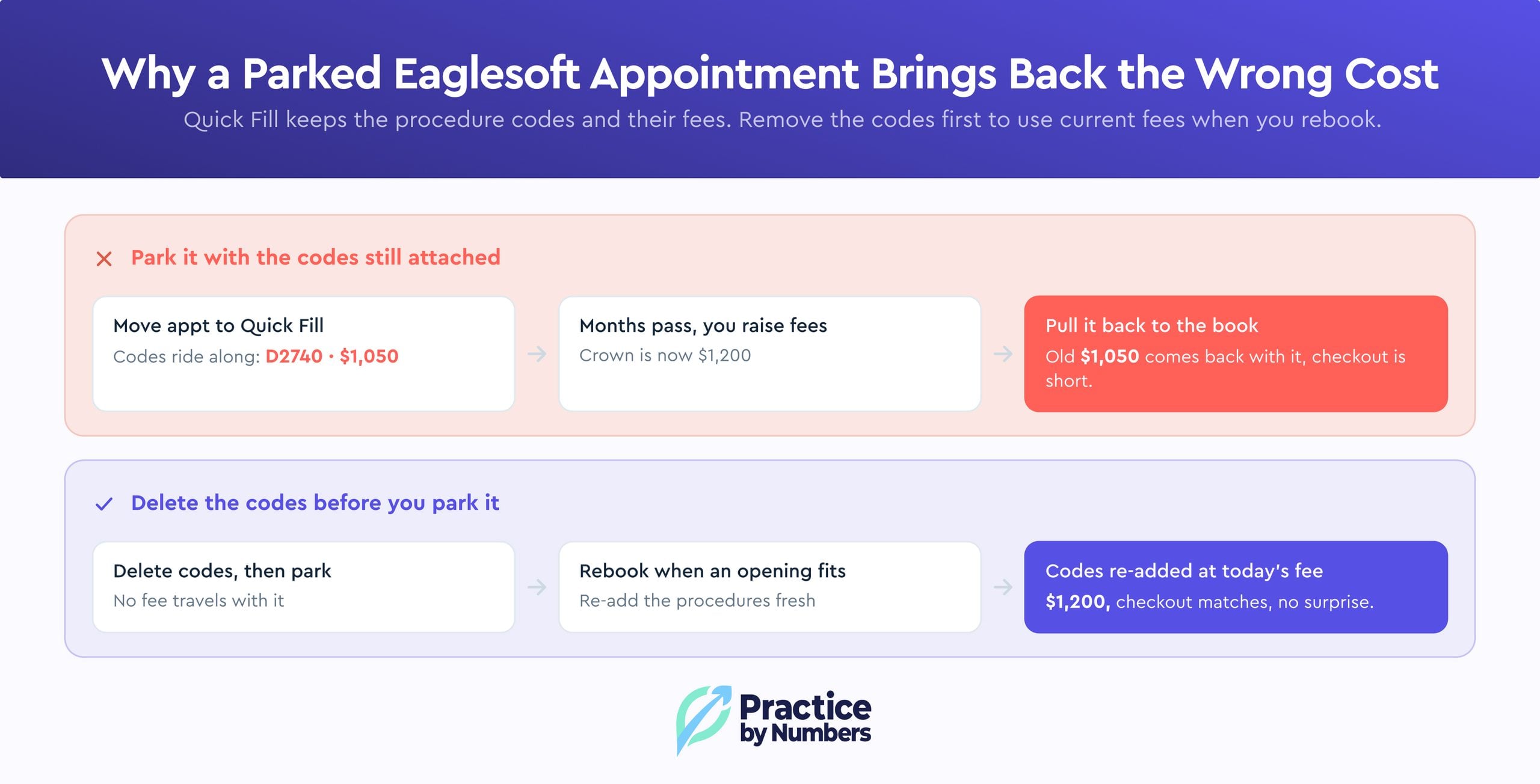
- Pro tip: when you move an appointment to Quick Fill, delete its procedure codes so old fees don’t follow it back onto the schedule.
- The Money Finder surfaces outstanding treatment by type, for example, every crown recommended but never scheduled.
- Both tools depend on clean charts; if plans aren’t kept current, the lists point you at the wrong patients.
- Practice by Numbers (PbN) adds automated recall and reactivation on top of Eaglesoft to keep the schedule full.
The Quick Fill List: A Bench of Ready Patients
The Quick Fill list in OnSchedule is your bench of patients who’d like to come in sooner than their scheduled date. When an opening appears, you have a ready list to call instead of staring at an empty chair. Van Epps’s favorite part is how specific you can make it.
“You can actually make it very robust. You can also break it down based on appointment type, whether it’s a hygiene appointment or a restorative appointment or a crown.”
– Shelly VanEpps
That matters because not every opening is interchangeable. A cancelled hour of hygiene should be filled with a hygiene patient, not a crown seat. Breaking the list down by appointment type means the person filling the gap can match the opening to the right patient in seconds, instead of scrolling one giant list.
👉 Learn How You Can Keep Your Eaglesoft Practice Secure and Compliant
Keep the List Clean, Or It Stops Working
A Quick Fill list is only as good as the names on it. Shelly’s biggest piece of advice for anyone using it is maintenance.
“Make sure to keep it clean. That’s when it starts to not be as helpful, is when you open it up and you have one thousand patients that have been cleaned out since 2015.”
– Shelly VanEpps
A list stuffed with patients who left the practice years ago is as good as no list, because it buries the handful of people you could actually call today. Prune it regularly so the names on it are current and reachable.
“If you keep it clean, then it will be a beautiful tool.”
– Shelly VanEpps
The Pro Tip: Delete the Codes Before You Park An Appointment
This is the tip Shelly says saved her team a lot of headaches, and it’s the kind of thing you only learn the hard way. When you pull an appointment off the schedule and drop it into Quick Fill, the procedure codes and their fees can travel with it. If your fees have gone up since then, you’ll pull that appointment back onto the schedule later carrying the old, lower fee.
“If you’ve increased your fees since the appointment was put into the quick fill, you end up pulling old fees and putting it into the appointment book.”
– Shelly VanEpps
The symptom is subtle: you walk the patient out, and the amount is off, and it takes a couple of confusing checkouts before someone realizes the stale appointment came from Quick Fill. Her fix is simple and worth building into your workflow.
“One pro tip is just delete the codes when you throw that appointment into Quick Fill.”
– Shelly VanEpps
Park the appointment without its codes, and when you rebook it, you’ll re-add the procedures at today’s fees. No stale pricing, no checkout surprises.
The Money Finder: Mine for Treatment That Was Never Scheduled
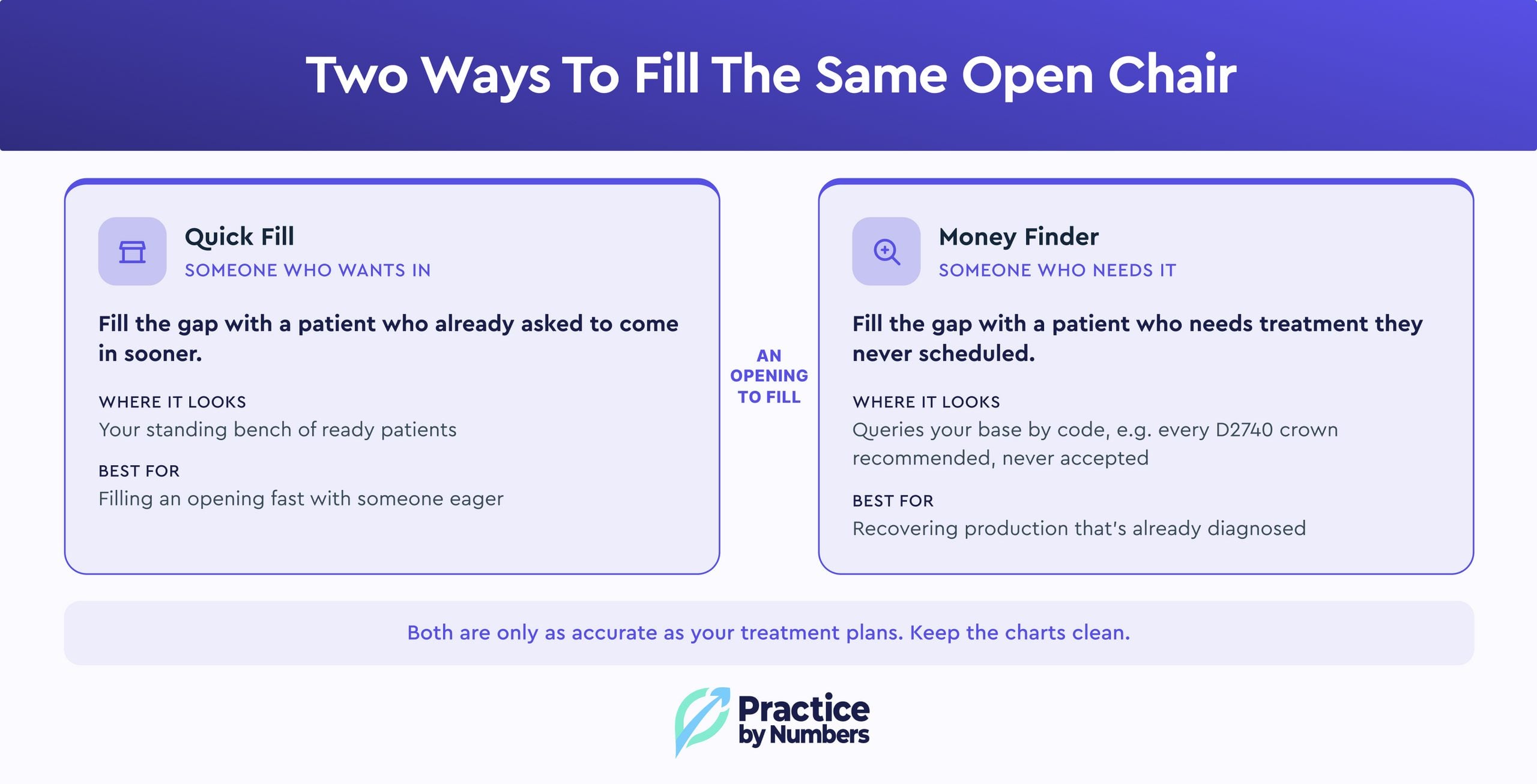
The Quick Fill list helps you fill an opening with someone who wants in. The Money Finder helps you fill it with someone who needs treatment they never scheduled. It’s a query tool that searches your patient base for outstanding treatment of a specific type, so you can match an opening to the right recommended work.
“I can run the report for looking for every 2740 code that’s been recommended that hasn’t been accepted. And it’ll list it all out for you in the Money Finder, which is a really cool tool.”
– Shelly VanEpps
In her example, D2740 is the code for a porcelain or ceramic crown. If you have a crown-length opening to fill, the Money Finder can hand you a list of every patient who was told they need a crown but never got on the schedule. You can do the same for scaling and root planing that never led to periodontal maintenance, or any other procedure sequence you’re trying to complete. It’s recovering production that’s already been diagnosed, revenue that’s sitting there waiting to be booked.
Clean Charts Make Both Tools Accurate
There’s a catch that ties back to data hygiene: the Money Finder is only as accurate as your treatment plans. Shelly cautions that you have to do a little digging through the results, because some of those patients may have already had the work done, or chose a different option that was never rejected.
If declined and completed treatment isn’t kept current in the chart, the Money Finder points you at the wrong people, and you risk calling a patient about a crown they already have. Keep the charts clean, and both tools stay sharp.
👉 See How to Handle Insurance and Collections Well in Eaglesoft
How Practice by Numbers fits alongside Eaglesoft
Quick Fill and Money Finder give teams useful ways to identify opportunities manually. Practice by Numbers adds an automated communication layer that helps teams follow up with patients more consistently.
Together, the tools can help teams:
- Work open opportunities: Use existing patient and scheduling data to identify areas that need attention.
- Automate follow-up: Support recall and reactivation campaigns through automated text and email outreach.
- Make scheduling easier: Two-way texting and online booking give patients more ways to respond and schedule.
- Reduce manual work: Automated workflows can help teams spend less time managing follow-up lists manually.
The roles are complementary. The PMS holds the practice data, while PbN helps teams communicate with patients and act on that data more efficiently. The built-in tools remain useful for day-to-day workflows, while automation can help extend the team’s reach.