The dental software market is in the middle of a fundamental shift from on-premise to cloud-based systems. Most new practices choose the cloud. Many established practices are migrating. In reality, both models have strengths, and both come with tradeoffs.
This article compares the two models honestly so you can decide based on your practice’s actual needs.
TL;DR
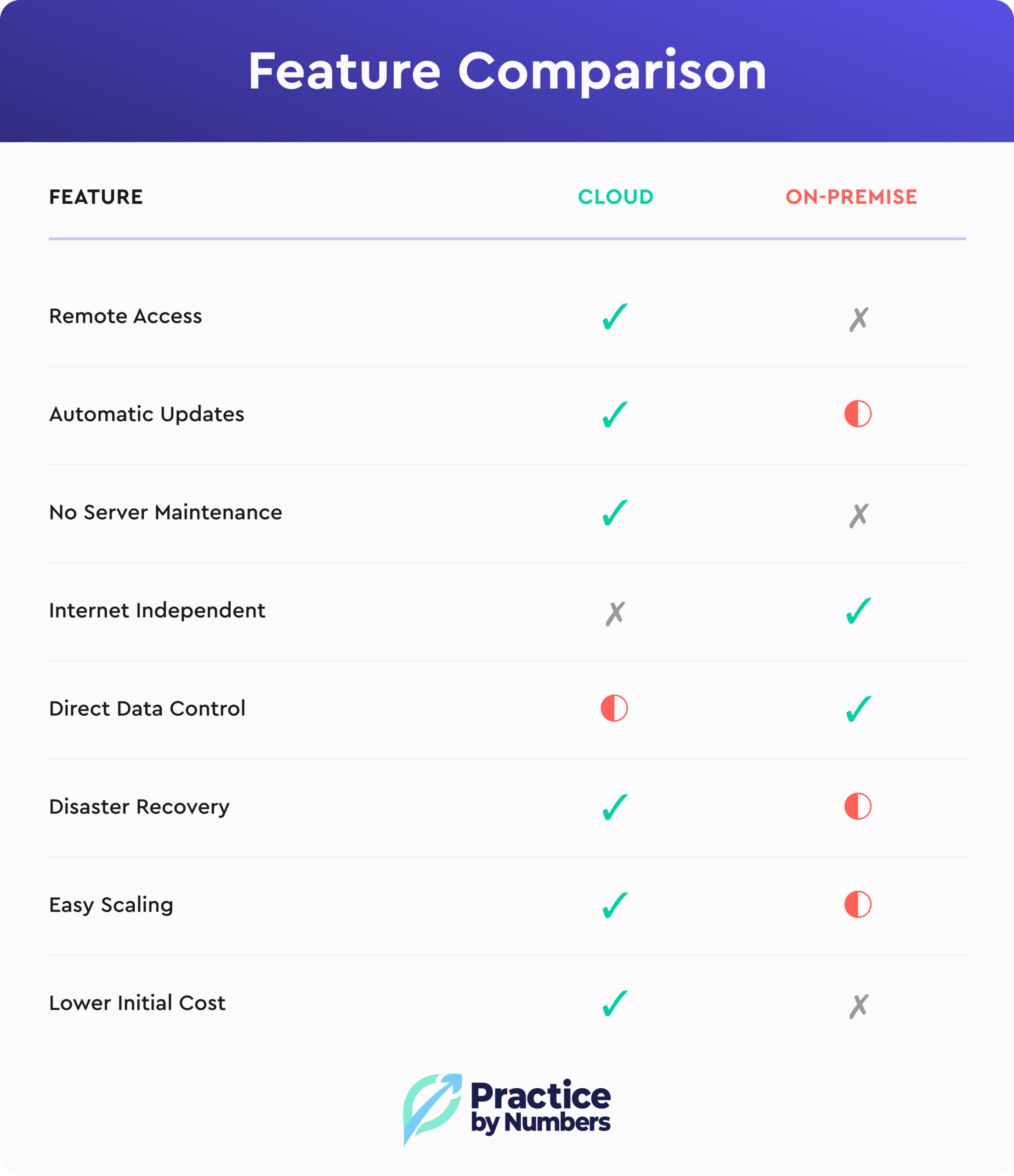
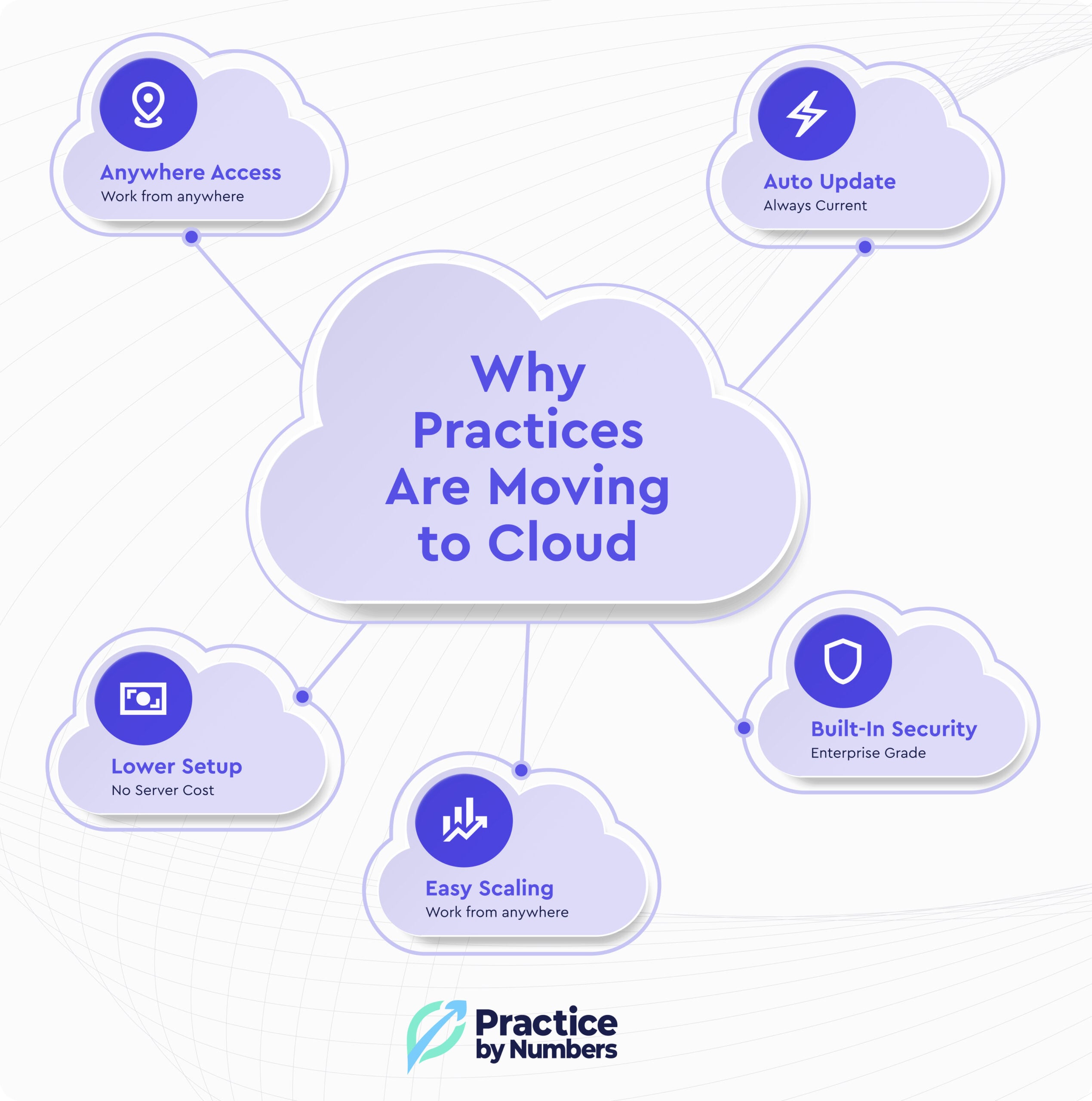
Most dental practices choosing software in 2026 are moving toward cloud-based systems and for good reason. Cloud dental software offers easier remote access, automatic updates, lower upfront costs, stronger disaster recovery, and simpler scaling for growing practices.
On-premise systems still hold their power in select cases, especially for practices with unreliable internet, dedicated IT resources, or long-term investment in legacy infrastructure.
For some practices, cloud is the better long-term fit. For others, a well-managed on-premise setup continues to work extremely well.
Quick rule of thumb:
- Choose cloud for flexibility, growth, lower IT burden, and modern workflows.
- Choose on-premise only if you have specific operational or infrastructure requirements.
What the Terms Actually Mean
On-Premise Dental Software
Runs on a server physically located in your office. Data is stored locally. Software updates require manual installation. Access is limited to devices on your office network unless you set up remote access separately.
Your practice owns or maintains:
- The server hardware
- Local data storage
- Backup systems
- Network security
- Software installation and updates
Access is generally limited to devices connected to the office network unless remote access tools or VPNs are configured separately.
Historically, this was the standard setup for dental offices because internet infrastructure and cloud technology were not mature enough for healthcare workflows.
What this means operationally:
- Your practice has more direct control over infrastructure.
- Your team is responsible for maintenance and uptime.
- Hardware failures become your problem to solve.
- IT support becomes essential over time.
For some practices, that level of control is valuable. For others, it becomes a hidden operational burden.
Cloud-Based Dental Software
Runs on the vendor’s servers and is accessed through a web browser. Data is stored in secure data centers. Updates happen automatically. Access is available from any device with an internet connection.
The vendor typically manages:
- Hosting
- Security infrastructure
- Software updates
- Backups
- Disaster recovery
- Performance optimization
What this changes operationally:
- Staff can work from anywhere.
- Multi-location management becomes easier.
- Updates happen automatically.
- Practices avoid purchasing and maintaining servers.
- Scaling becomes significantly simpler.
The biggest shift is that software stops behaving like office equipment and starts functioning like a continuously maintained service.
Where Cloud Wins
1. Accessibility and Remote Flexibility
Cloud software fundamentally changes how practices access information. With cloud-based dental practice management software, doctors and managers can:
- Check schedules remotely
- Review reports from home
- Monitor production across locations
- Access patient information securely while traveling
- Manage operations without being physically in the office
This flexibility matters more than ever for:
- Multi-location groups
- Growing DSOs
- Hybrid administrative teams
- Owners who travel frequently
- Practices outsourcing billing or insurance workflows
On-premise systems can replicate some of this functionality through VPNs or remote desktop setups, but those solutions are often slower, more complex, and dependent on IT maintenance.
Cloud access is native. That difference matters operationally.
2. Lower IT Burden
One of the most underestimated costs in dentistry is software maintenance. With cloud software, practices generally do not need to manage:
- Physical servers
- Manual software installations
- Hardware upgrades
- Backup systems
- Most security patching
Cloud systems eliminate most of that operational overhead because the vendor manages infrastructure centrally. This can reduce the operational burden on practices without dedicated IT resources.
For smaller offices, especially, minimizing infrastructure management can simplify day-to-day operations significantly.
Why this matters financially:
Many practices compare only software subscription pricing while ignoring:
- IT consultant fees
- Emergency server repairs
- Backup failures
- Downtime costs
- Hardware replacement expenses
In practice, cloud systems often reduce total operational complexity far more than practices initially expect.
3. Easier Software Updates
Some practices delay software updates entirely because they fear disrupting operations.
That creates long-term risks:
- Security vulnerabilities
- Unsupported software versions
- Integration failures
- Reduced performance
Cloud software updates happen automatically in the background. Everyone stays on the latest version without:
- Manual installations
- Office downtime
- Local server modifications
This becomes increasingly important as dental technology ecosystems become more interconnected.
4. Better Disaster Recovery
Many offices believe they are protected because they have backups, but backup systems frequently fail silently until recovery is actually needed.
Cloud vendors typically maintain:
- Redundant data centers
- Continuous backups
- Geographic failover systems
- Automated recovery protocols
This level of infrastructure is difficult and expensive for individual practices to replicate internally.
Disaster recovery is one of the clearest practical advantages of cloud-based dental software.
5. Simpler Scaling for Growing Practices
Cloud systems scale much more efficiently because infrastructure expansion happens at the vendor level rather than inside the practice.
This is especially valuable for:
- Expanding group practices
- Emerging DSOs
- Practices planning acquisitions
- Offices consolidating operations
Cloud systems are generally designed with scalability in mind from the beginning.
Where On-Premise Dental Software Still Performs Strongly
1. Internet Independence
This remains the strongest argument for on-premise systems. If internet access fails, on-premise systems usually continue functioning locally. For practices in areas with unstable internet infrastructure, this can still be a legitimate operational concern.
That said, many modern practices mitigate this risk through:
- Redundant internet providers
- Cellular failover systems
- Backup hotspots
As internet reliability improves globally, this advantage becomes less significant for most urban and suburban practices.
2. Direct Infrastructure Control
Many practices value having direct ownership and control over:
- Data storage
- Infrastructure
- Backup procedures
- Internal access management
This level of control can be especially important for:
- Larger organizations with internal IT teams
- Practices with established compliance workflows
- Offices heavily customized around legacy systems
For teams comfortable managing infrastructure internally, on-premise systems can offer a sense of operational stability and familiarity.
3. Potential Long-Term Cost Advantages
Some on-premise systems offer perpetual licensing rather than recurring subscription pricing. Depending on:
- Practice size
- Hardware lifecycle
- IT resources
- Length of ownership
The long-term cost structure can sometimes compare favorably against ongoing subscription models.
That said, practices should evaluate the full operational picture, including:
- Server maintenance
- Hardware replacement
- IT support
- Backup systems
- Downtime risk
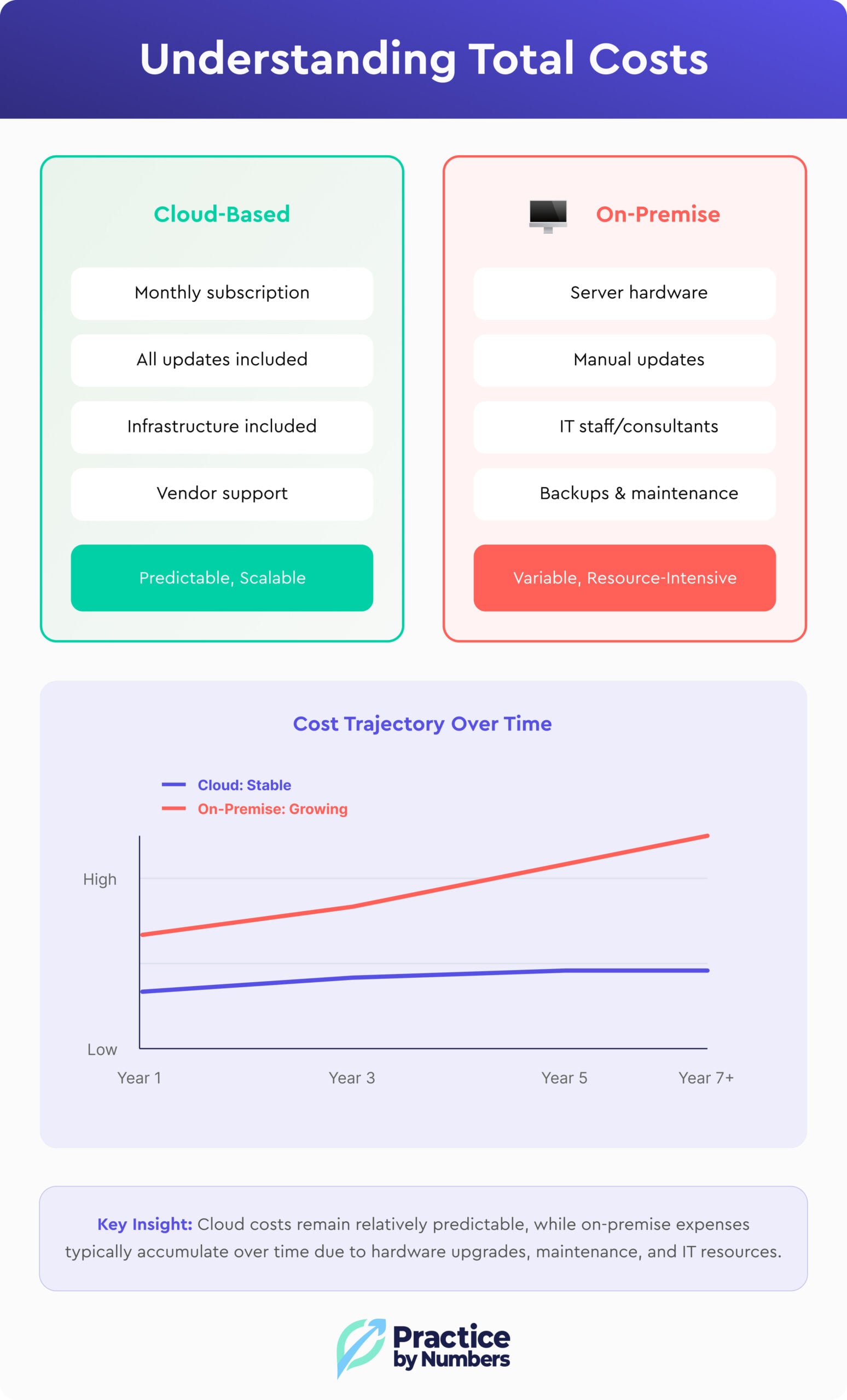
The most accurate comparison is the total cost of ownership over time.
The Security Question
Security concerns are the most common objection to cloud software. The reality is that cloud vendors invest far more in security infrastructure than individual dental practices can. Enterprise-grade encryption, access controls, penetration testing, compliance certifications, and 24/7 monitoring are standard for reputable cloud dental software vendors.
On-premise security, by contrast, depends on the practice’s own IT practices. Many dental offices run outdated operating systems, use weak passwords, lack encryption, and have no formal security monitoring. The server sitting in a closet is not inherently more secure than a professionally managed data center.
Which One Should You Choose?
Choose Cloud-Based Dental Software If:
- You want minimal IT maintenance
- You value remote accessibility
- You operate multiple locations
- You expect future growth
- You prefer predictable subscription costs
- You want easier integrations with modern tools
- You want faster deployment and scaling
- You do not want to manage servers internally
Cloud systems are increasingly popular for practices seeking agility and simplified maintenance.
Choose On-Premise Software If:
- Your current system already supports your workflows well
- You have dependable IT support
- You prefer direct infrastructure control
- Your internet reliability is inconsistent
- Your practice relies heavily on legacy integrations or customizations
- You want to avoid major operational disruption from migration
For many established practices, staying on-premise can still be a practical and effective decision.
Both Models Will Continue to Coexist
The industry is undoubtedly seeing strong cloud adoption, especially among newer practices and expanding organizations. At the same time, on-premise software continues to power a large portion of the dental market, particularly among mature practices with established operational systems.
What matters most is not choosing the “trendier” option. It is choosing software infrastructure that:
- Fits your workflow
- Supports your growth plans
- Aligns with your operational capabilities
- Minimizes disruption
- Helps your team work efficiently
For some practices, that will mean cloud. For others, a stable on-premise environment may continue delivering value for years.
Key Takeaways
- Cloud-based dental software offers flexibility, remote access, easier updates, and reduced infrastructure management.
- On-premise systems still provide strong reliability, control, and workflow stability for many practices.
- Security depends more on maintenance and operational discipline than deployment model alone.
- Total cost comparisons should include infrastructure, IT support, and operational overhead, not just licensing fees.
- The best choice depends on your practice’s operational priorities, growth strategy, and comfort with technology management.
Frequently Asked Questions
Q. What happens to my data if the cloud vendor goes out of business?
Reputable vendors include data portability provisions in their contracts. Before signing, confirm that you can export your data in standard formats. This is a reasonable concern that should be addressed contractually, not used as a reason to avoid the cloud entirely.
Q. Is cloud dental software HIPAA-compliant?
Yes, when provided by reputable vendors. HIPAA compliance requires encryption, access controls, audit logs, and a Business Associate Agreement, all of which established cloud dental software providers offer. Verify compliance certifications before purchasing.
Q. Can I migrate from on-premise to cloud without losing data?
Yes. Most cloud vendors offer migration services that transfer patient demographics, appointment history, and financial data. Clinical data migration (charting, images) varies in completeness. Plan 4-8 weeks for a typical migration.