To choose dental practice software without overpaying, start by listing the jobs your practice must solve now, such as phones, scheduling, patient communication, and buy only those. Pick a platform with modular pricing and a clear upgrade path so you can add capabilities as you grow, instead of paying for an all-in-one bundle you won’t fully use.
That sounds obvious. Yet most practices buy software the other way around. They pick the longest feature list, sign a multi-year contract, and discover six months later that half the modules sit untouched while the front desk still juggles three logins.
This guide walks you through a buying process that ties every dollar to a real outcome: more booked chairs, fewer no-shows, faster collections, and nothing else.
- If you’re evaluating dental practice management software, don’t start with features, start with your biggest operational challenges.
- Identify the problems your software should solve first (missed calls, scheduling, patient communication, collections, and more)
- Separate day-one essentials from features that can wait
- Compare modular pricing vs. all-in-one bundles to avoid overpaying
- Spot and avoid shelfware, i.e, features you pay for but never use
- Ask the right questions during vendor demos before signing a contract
- Choose software that scales with your practice instead of forcing expensive migrations later
- Use a practical 8-point checklist to confidently evaluate and compare vendors
What Dental Practice Management Software Actually Does
Dental practice management software is the operating system for the non-clinical side of your practice. At its core, it should handle the work that keeps the schedule full and the revenue flowing:
- Phones and call handling: Capturing every inbound call, routing it, and making sure missed calls become booked appointments instead of lost revenue. Every missed call is a potential patient who never books.
- Scheduling: Filling the chair, managing recall and reactivation, and reducing gaps and no-shows. A single hygiene gap can cost hundreds in production.
- Patient communication: Appointment reminders, two-way texting, confirmations, and follow-ups that keep patients engaged between visits.
- Analytics and reporting: Showing you where production is leaking, which providers are booked, and what your unscheduled treatment is worth.
- Payments: Collecting at the point of care and chasing down balances without awkward phone calls. Faster payment collection improves cash flow without losing margins or increasing overheads.
- Automation: Handling repetitive front-desk tasks so your team spends time on patients, not data entry.
Notice what’s not on the day-one list. It doesn’t have to do everything at once. The question isn’t “which platform has the most features?” It’s “which platform solves the problems costing me money right now, and can grow with me later?”
The 5 Questions to Ask Before You Buy
Before you sit through a single demo, answer these. They’ll cut your shortlist in half.
1. What is the most expensive problem my practice has today? Missed calls? A leaky recall system? Slow collections? Buy a fix for that first. Everything else is secondary.
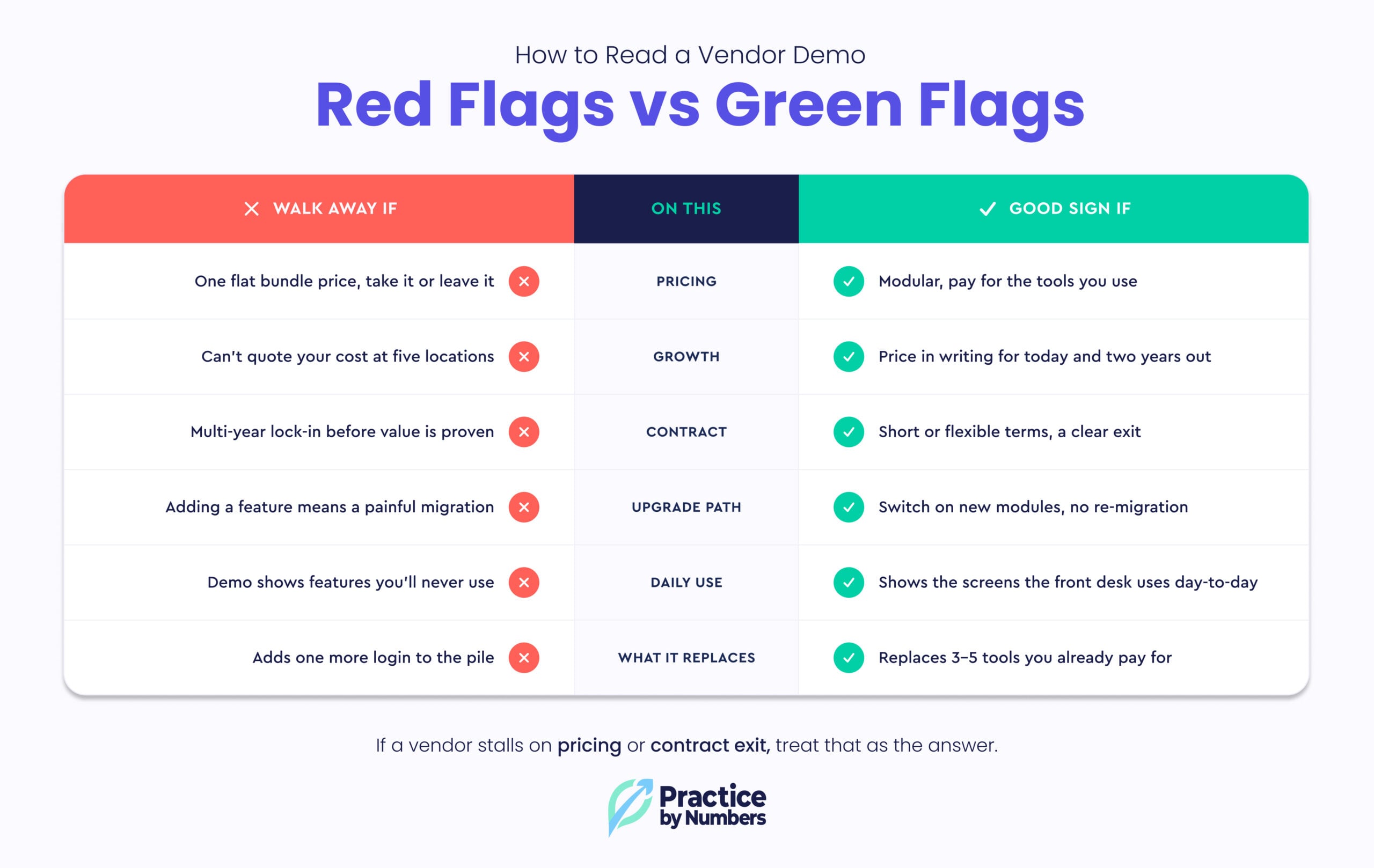
2. What does this actually replace? If a tool doesn’t retire a spreadsheet, a sticky note, a second login, or a vendor invoice, it’s adding cost, not removing it.
3. How is it priced and what happens when I grow? Per-location? Per-feature? Flat bundle? Is it built for a practice size like mine? You want to know your cost at one location and at five before you sign anything.
4. How long is the contract, and what’s the exit? Long lock-ins make sense only when the value is proven. A platform confident in its product won’t need to trap you.
5. Will my team actually use it? The best feature set is worthless if the front desk avoids it. Ask to see the screens your staff will touch every hour.
If a vendor can’t answer questions 3 and 4 clearly, treat that as the answer.
👉 Here are10 Dental Practice Management Tips Every Office Should Try
Features Most Practices Need on Day One vs. Features That Can Wait
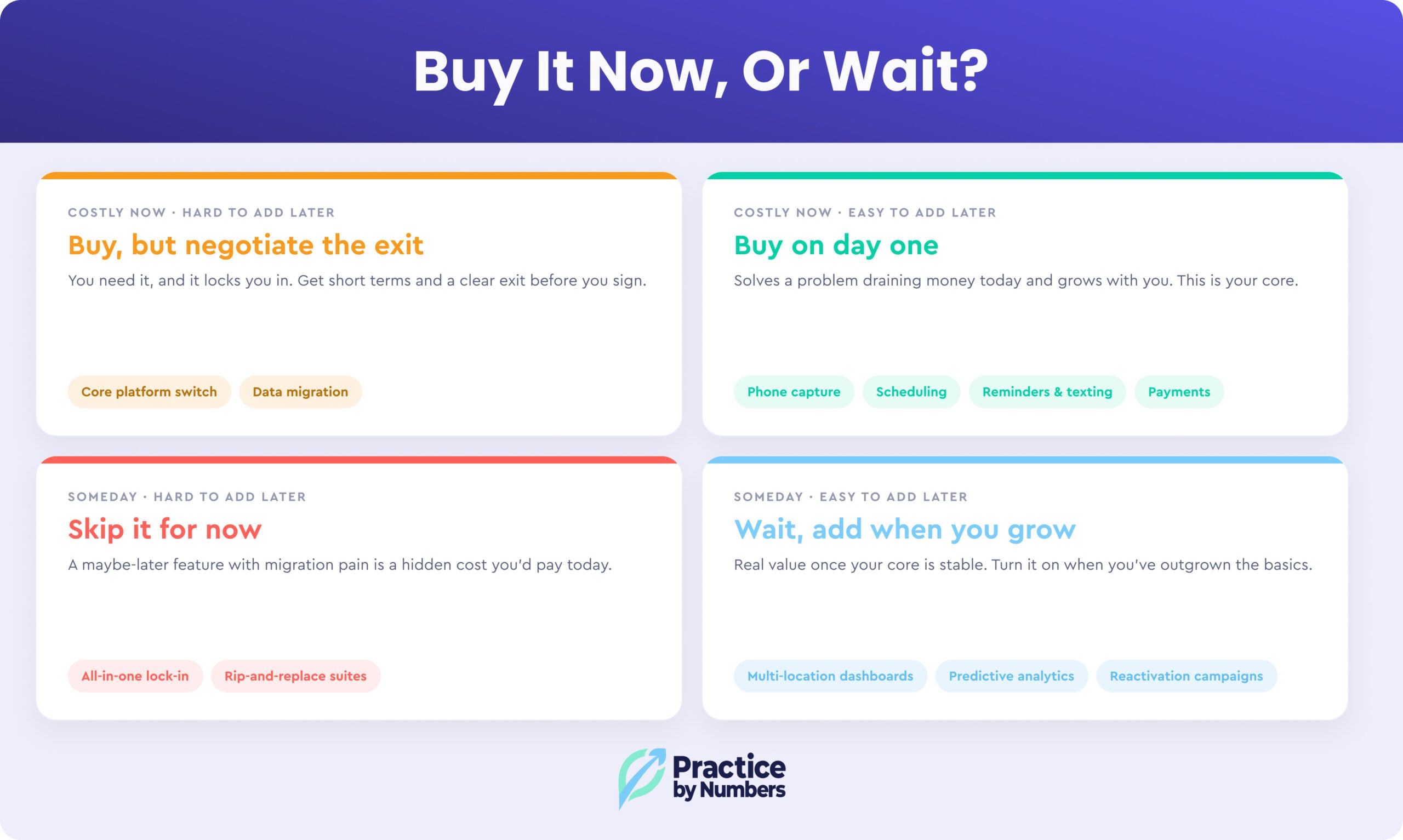
Overpaying starts with buying tomorrow’s features at today’s price. Most practices need a tight core to get value immediately, then layer on capabilities once the basics are running smoothly.
Phase-one Essentials | Add Later |
|---|---|
Inbound phone capture and call routing | AI call summaries and advanced call scoring |
Online and front-desk scheduling | Automated reactivation campaigns |
Appointment reminders and two-way texting | Multi-location performance dashboards |
Basic production and recall reporting | Predictive analytics and benchmarking |
Point-of-care payments | Advanced payment plans and financing tools |
Patient confirmations | Reputation and review automation |
The “add later” column isn’t fluff. Those features drive real returns once your core is stable. The point is sequencing. A single-location practice that can’t reliably answer its phones shouldn’t be paying for a multi-location benchmarking dashboard yet.
Modular Pricing vs. All-in-One Bundles
This is where many practices end up paying more than they should.
- All-in-one bundles package every capability under one price. They’re tidy and predictable, and for a large group that will genuinely use every module from day one, that can be the right call.
- Modular pricing lets you start with the core tools and switch on additional capabilities as you need them. You pay for what you use, and you expand on your own timeline.
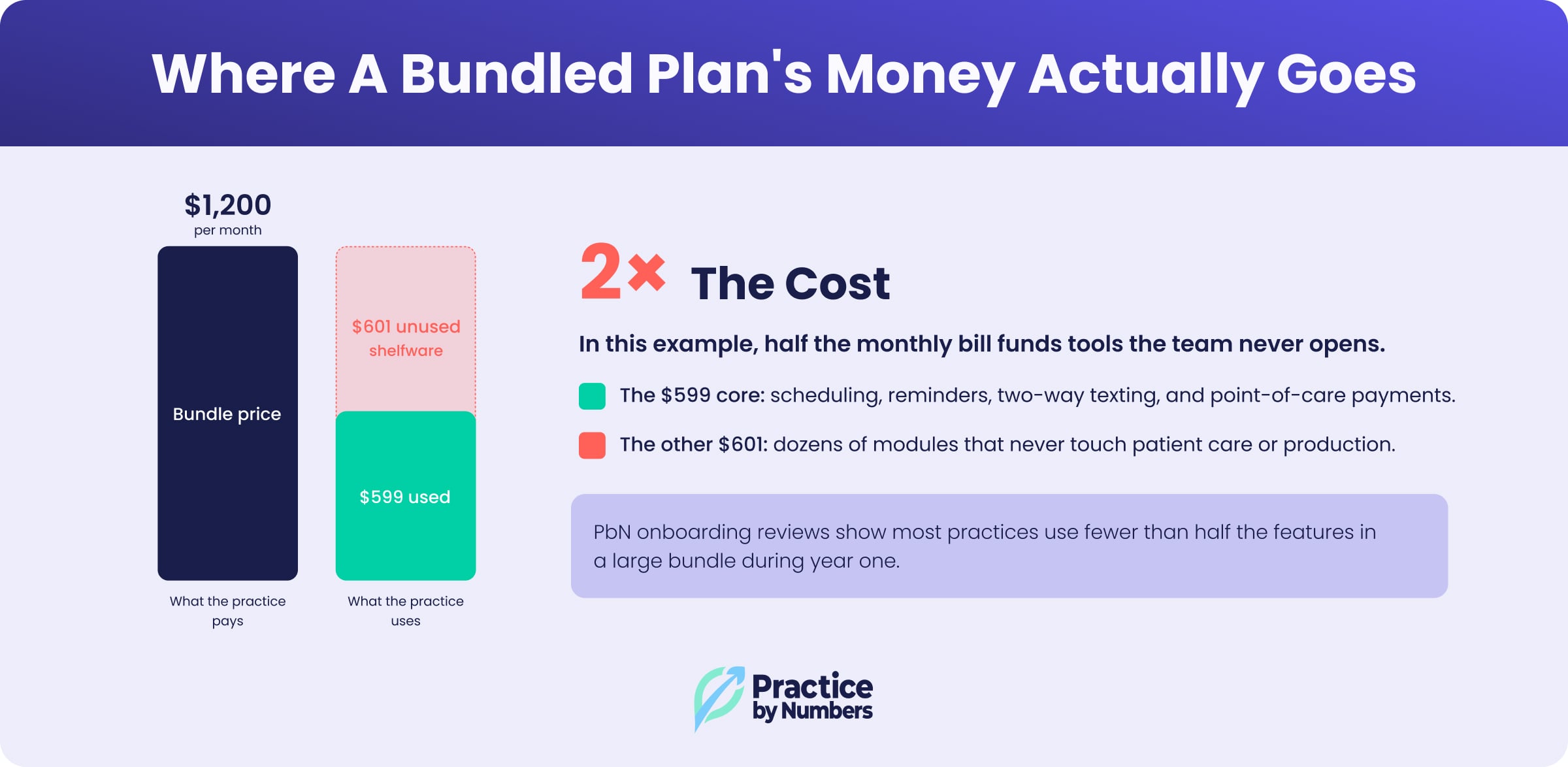
The trap with bundles isn’t the bundle itself, it’s the math. When you pay one flat price for forty features, and your team uses twelve, the other twenty-eight are pure overhead. That’s shelfware, meaning software you own, pay for, and never touch.
Let’s say a practice pays $1,200/month for a bundled platform but only actively uses scheduling, reminders, texting, and payments, which can be covered under $599, it means 2x the cost each month may be funding features that never affect patient care, team efficiency, or production.
The numbers that should drive your decision:
- PbN onboarding reviews show most practices actively use fewer than half of the features included in large bundled platforms during their first year.
- Practices moving to PbN commonly replace 3–5 separate front-office tools.
- A phase-one implementation focused on communication, scheduling, and patient engagement can save you around $100 each month, which is almost $1200 saved each year.
For most small and mid-size practices, the modular path wins because it matches spend to value. You’re never paying for a capability you haven’t grown into yet.
👉 Here Are the 5 Benchmarks Every Dental Practice Should Know and Set
How to Avoid Paying for Shelfware
Shelfware is the silent budget killer. Here’s how practices end up with it and how to dodge it:
- You bought the bundle for one feature. You wanted better texting and got forty modules to go with it. Buy the feature, not the catalog.
- The “free” extras have a real cost. Every module your team has to learn, configure, and ignore is a tax on attention, not a gift.
- Nobody owns adoption. If no one on staff is responsible for turning a module on and training the team, it won’t get used, no matter how good it is.
- You confused capability with usage. Owning a predictive analytics dashboard means nothing if no one opens it on Monday morning.
The Most Expensive Software Feature Is the One Nobody Uses. The fix is only paying for what you’ll use this quarter, and adding the next module when you’ve actually outgrown the last one.
A Simple Framework: Needs Today, Path for Tomorrow
Pull it all together with a two-part test for every purchase.
Needs today: Does this solve a problem that is costing me money or patients right now? If yes, it’s a day-one buy. If it’s a “nice to have someday,” it waits.
Path for tomorrow: Can I add this later without ripping out my system, re-training my team, or re-signing a contract? If the platform makes expansion easy, you can safely start small. If adding a feature later means a painful migration, that’s a hidden cost you’re paying now, whether you see it or not.
The right platform lets you buy narrow today and grow wide tomorrow, on your schedule, not the vendor’s.
👉 Learn How to Streamline Collections and Cash Flow
Your Copyable Decision Checklist
Run every shortlisted platform through this before you sign:
1. List your top three revenue-leaking problems. Confirm the platform solves all three on day one.
2. Confirm modular or per-feature pricing exists so you can buy the core without the catalog.
3. Get the price in writing for your current size and your projected size in two years.
4. Confirm there’s a clear upgrade path with no re-migration to add features later.
5. Verify the contract length and exit terms. Short or flexible beats long and locked.
6. Have a front-desk team member test the daily-use screens before purchase.
7. Identify who on your team owns adoption for each module you turn on.
8. Calculate what you’d actually use in 90 days. Pay for that, not the full feature list.
If a platform clears all eight, you’re buying value, not shelfware.