Your front desk is managing check-ins, insurance questions, chart requests, and rescheduling, all at the same time. In that environment, calls get missed, not because of negligence, but because the volume exceeds the bandwidth. And missed calls have a direct cost.
Industry data suggests practices miss around 30% of inbound calls, with a significant share being new patient inquiries, the highest-value calls you receive. If you’re investing in SEO, paid ads, or referrals but can’t reliably answer the phone, you’re generating leads you’re not capturing. That patient called, got no answer, and moved on to the next practice. You’ll never know they existed.
A virtual receptionist closes that gap. Whether it’s a live answering service, an AI voice agent, or a hybrid of both, the goal is simple: every call gets answered, new patients get a real response, and your front desk can focus on whoever is standing in front of them.
This article covers how to evaluate your options, set one up without disrupting your workflow, and measure whether it’s working.
What “Virtual Receptionist” Actually Means
The term gets applied loosely by vendors, so it’s worth being precise about what each model actually does and where it fits. In dental, “virtual receptionist” usually falls into one of these:
- Live virtual receptionist: Remote human agents handle calls on your behalf using your scripts, scheduling rules, and escalation protocols. They operate as an extension of your front desk, typically covering overflow during peak hours and full coverage after hours. The quality of this model depends heavily on how well the agents are trained on dental-specific workflows like insurance terminology, procedure names, and urgency triage. Generic answering services without dental experience tend to underperform.
- AI virtual receptionist: An automated voice agent that answers, routes, captures patient information, and in some configurations, books appointments directly into your practice management software. AI agents have improved significantly in conversational quality and integration capability. They handle high call volumes without hold times and are available 24/7. The current limitation is nuanced conversations, which means anything requiring judgment, empathy, or clinical context still needs a human handoff.
- Auto-attendant / IVR: Automated call routing that directs callers to the right department or function. IVR is a useful infrastructure, but it doesn’t handle calls, it organizes them. It’s often the first layer in a multi-layer call system, not a standalone solution.
Most practices that do this well use a layered approach: IVR for initial routing, human or AI coverage for overflow and after-hours, and a structured workflow to recover missed calls that fall through regardless. The combination addresses different failure points in the call journey and is more resilient than relying on any single solution.
Why It Matters?
How your team handles inbound calls directly impacts new patient growth. Call responsiveness doesn’t just affect appointment bookings. It shapes patient perception.
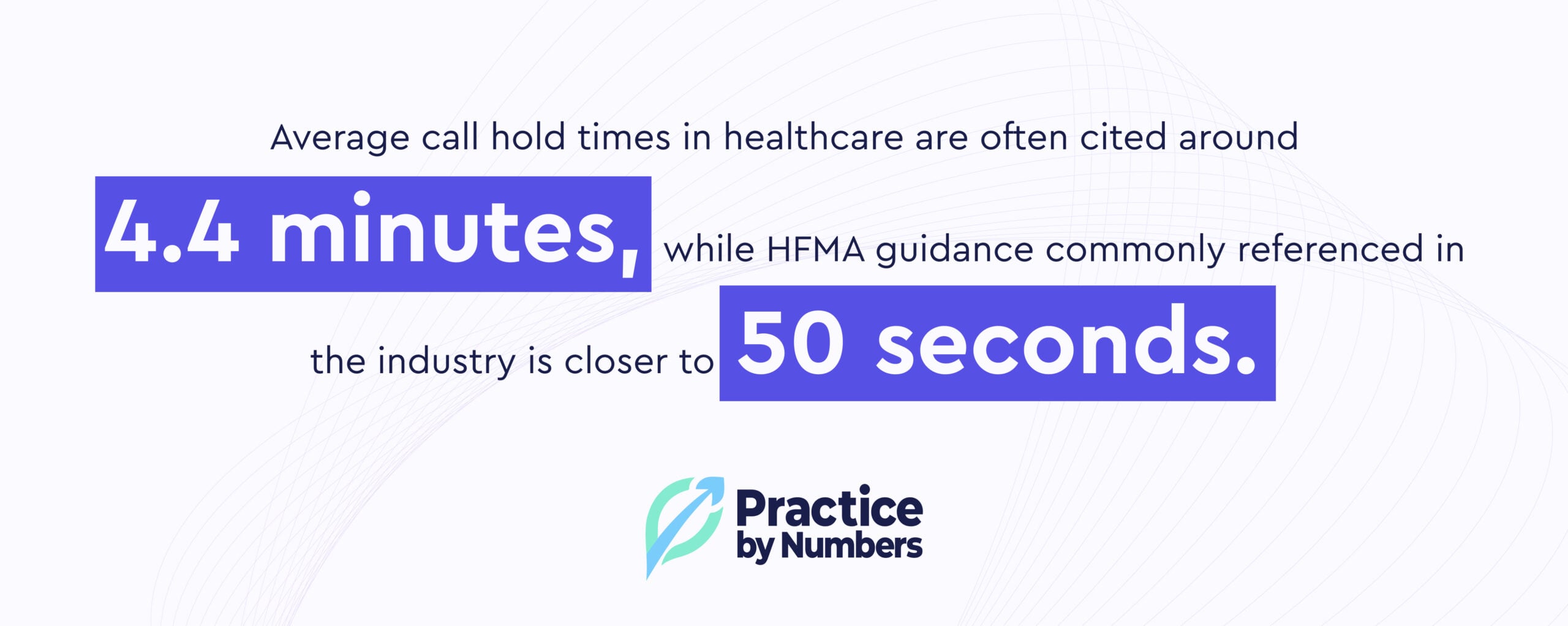
Whether your practice is a call center or not, patients expect quick access. When they call a dental office, they want a real person, not hold music, not voicemail, and not a call back hours later. If the call isn’t answered live, many won’t try again. In competitive markets where multiple practices are just a click away, hanging up often means moving on.
And voicemail rarely recovers that loss. Most callers who hang up don’t leave a message. And as voicemail usage declines overall, relying on it as a safety net is risky.
There’s also a secondary effect worth noting: practices that answer calls reliably generate better online reviews. Response time and accessibility are consistently cited in patient satisfaction research as drivers of positive reviews and word-of-mouth referrals. The revenue impact of improved call handling extends beyond direct bookings. Improving call handling is often one of the highest-ROI operational changes a practice can make because it affects patients who are already ready to book.
Missed Calls Are a Direct Revenue Problem
The scale of the problem is larger than most practice owners realize. You don’t need perfect numbers to see the pattern, but here are a few industry benchmarks that make the point.
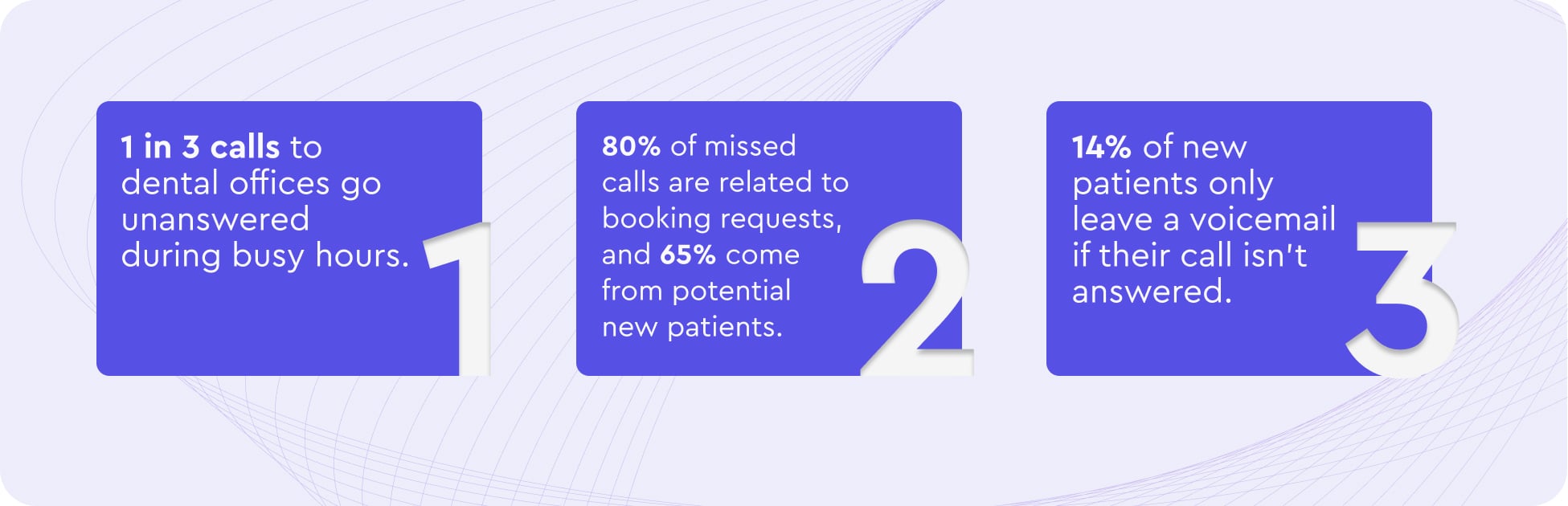
The revenue math follows directly. Missed or delayed inquiries can significantly impact annual revenue. And if you’re spending on SEO or paid ads to drive those calls in the first place, the compounding effect is worse. You’re paying to generate leads you’re not nurturing. If a new patient relationship has meaningful long-term value, and in dentistry, it does, then a missed new patient call isn’t a minor front desk inconvenience. It’s a growth limiter, compounded every week it goes unaddressed.
Online Scheduling Doesn’t Replace the Phone
“But aren’t people booking online now?” Yes, and that’s part of the point.
Patient expectations around digital access have shifted. A growing share of people, particularly younger patients, prefer to book appointments without making a phone call. Dental and healthcare industry publications have tracked this shift consistently, and the demand for online scheduling has only grown.
But online booking doesn’t replace the phone. It runs alongside it. Emergencies don’t come through a scheduling widget. Patients with insurance questions call. Anxious first-timers often want to speak to someone before they commit. And many high-value cases, like complex treatment or patients who’ve been avoiding care, begin with a real conversation.
The goal isn’t choosing between phone and digital. It’s access. The right model is ‘access’ across channels: phone, online scheduling, and, where appropriate, two-way text. Patients should be able to reach your practice through whichever method suits their situation, and each channel should have a defined workflow behind it. Gaps in either one cost you revenue.
Where Virtual Receptionists Fit in a Dental Practice
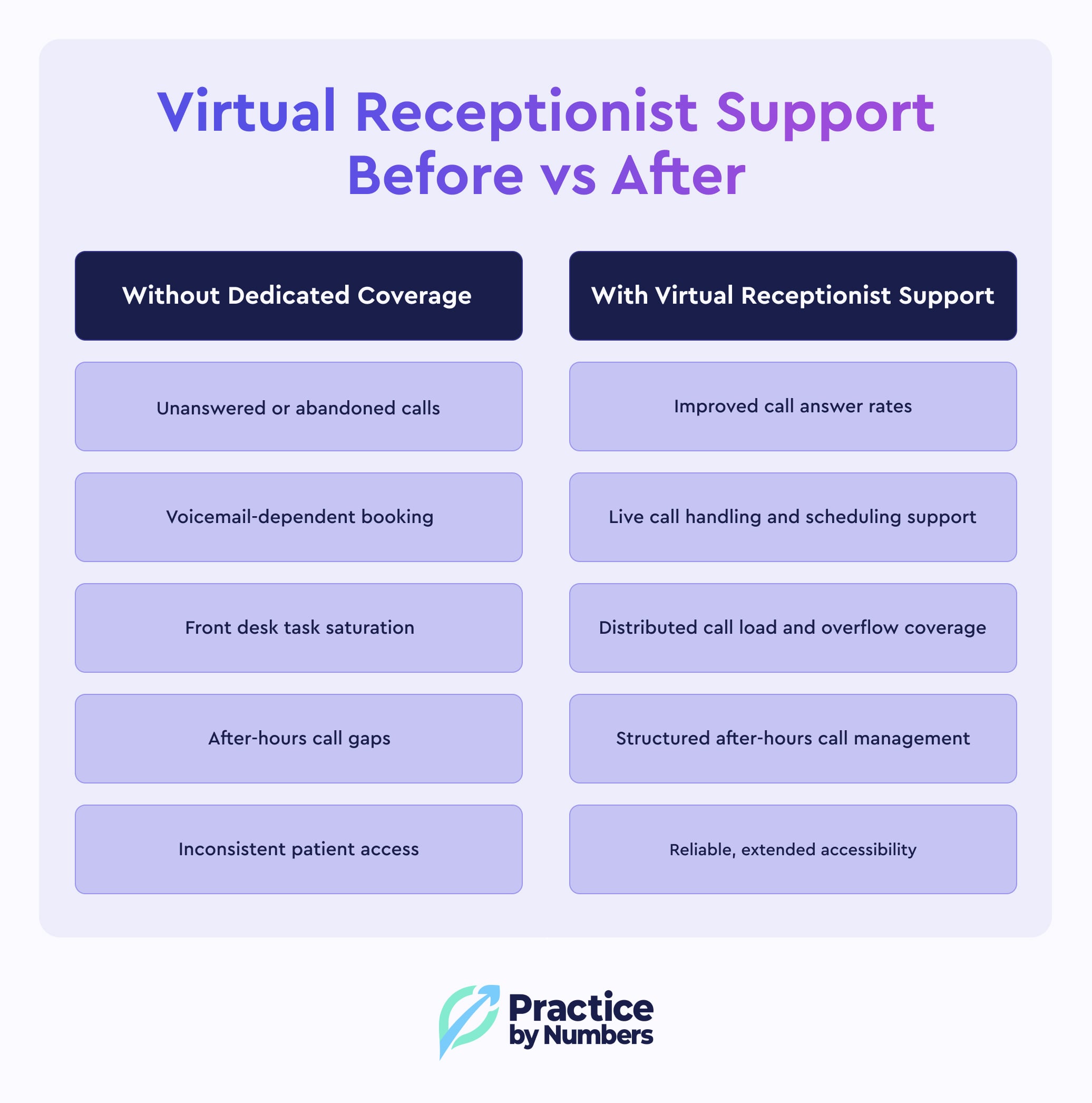
At the majority of dental practices, calls spike at the same three moments every day, and that is when the practice opens, during lunch, and right before close. That’s exactly when your front desk is least available to answer them. A virtual receptionist doesn’t replace your team, it covers the gaps.
A properly set up virtual receptionist is a robust capacity solution. Here’s how it actually empowers dental practices:
1. Overflow coverage during peak hours
Call volume in dental practices is not evenly distributed. It spikes in the morning when the office opens, around lunchtime, and again near the end of the day. Those are precisely the windows when your front desk is also managing the highest in-office activity. Overflow coverage during those specific windows rather than all-day coverage is often the most cost-effective starting configuration and delivers the fastest measurable improvement in answer rates.
2. Appointment booking and rescheduling
Capability varies significantly by solution. Some virtual receptionists can only take a message and create a callback task. Others integrate directly with Dentrix, Eaglesoft, or Open Dental to book in real time, check provider availability, and apply scheduling rules. The distinction matters. A solution that can only take messages reduces missed calls, but doesn’t recover the booking. A solution with direct scheduling integration recovers both. Understand exactly what you’re getting before committing.
3. After-hours call management
After-hours is where the voicemail problem is most acute. Patients calling outside business hours are often dealing with pain, anxiety, or urgent scheduling needs. A virtual receptionist at that hour can assess urgency, route genuine emergencies to an on-call line, capture information for next-day callbacks, and book available appointments, giving patients a resolution rather than a voicemail box. That experience has a meaningful effect on whether a new patient follows through or calls a competitor in the morning.
4. Front desk capacity and focus
High call volume forces front desk staff to split attention between phone and in-office patients, which degrades both experiences. Offloading routine call handling, such as appointment confirmations, direction requests, basic insurance questions, and standard reschedules, allows in-office staff to give full attention to patients in the chair and at the counter. This also reduces staff burnout and turnover, which carries its own operational cost. Dental staffing has been a persistent challenge across the industry, and improving the working environment for existing staff has real retention value.
Where Virtual Receptionists Require Careful Design
A virtual receptionist is not appropriate for every call type by default, and practices that deploy it without thinking through exceptions tend to have poor experiences.
This is where practices face challenges:
- Complex clinical conversations (pain triage can go sideways fast)
- Emotional situations (complaints, billing disputes)
- Nuanced case acceptance conversations (high value, high trust)
The problems don’t show up on routine calls. They show up when a patient is in pain, and the system misreads urgency. When someone calls frustrated about a bill and gets a bot. When a patient is on the fence about a $4,000 treatment plan, and needs a human to close the gap.
No virtual receptionist should be handling those moments. Not because the technology is bad, but because those conversations run on trust, and trust doesn’t route well through automation.
The fix isn’t avoiding a virtual receptionist. It’s routing rules + escalation.
The difference between a virtual receptionist that helps and one that damages your reputation comes down to 3 routing decisions:
- Routine scheduling and simple reschedules can be handled virtually, start to finish. That’s the sweet spot: high volume, low stakes, easily automated.
- Anything clinical or emotionally charged gets escalated to a human, immediately, without friction. Pain calls, complaints, and billing disputes need a live voice, and patients need to feel that transition happen fast.
- Emergencies follow a strict, pre-built protocol. Not “use your judgment.” Not “leave a message.” A defined path with a defined outcome, every time.
The goal isn’t full automation. It’s knowing exactly where automation ends and making sure there’s always something better waiting on the other side of that line.
HIPAA Compliance Requirements
If your virtual receptionist handles any protected health information, such as patient names combined with appointment details, health conditions, insurance information, or anything else that qualifies as PHI under HIPAA, the vendor is a Business Associate under HHS guidelines.
A Business Associate Agreement (BAA) is legally required before any PHI is exchanged. This is not optional and should not be treated as a formality.
Beyond the BAA, there are operational compliance requirements worth understanding:
- Minimum necessary standard. HIPAA requires that PHI be disclosed only to the extent necessary to accomplish the intended purpose. For a virtual receptionist, this means call scripts should be designed to capture only what’s needed for the booking or routing task at hand, not to gather or store additional patient information.
- Data storage and retention. Understand where call recordings and captured data are stored, for how long, and under what security controls. Some virtual receptionist vendors store recordings in environments that may not meet HIPAA technical safeguards. Verify this before signing.
- Breach notification obligations. If your vendor experiences a data breach involving PHI, your practice has notification obligations under HIPAA. The BAA should define the vendor’s responsibility to notify you and the timeline for doing so.
- Staff and script consistency. Even with a compliant vendor, scripts that prompt agents to ask for or share more PHI than necessary create compliance risk. Review scripts specifically for information-handling practices, not just call quality.
If a vendor is evasive about their BAA process, unclear on data storage practices, or unable to provide documentation of their HIPAA compliance posture, treat that as a disqualifying issue.
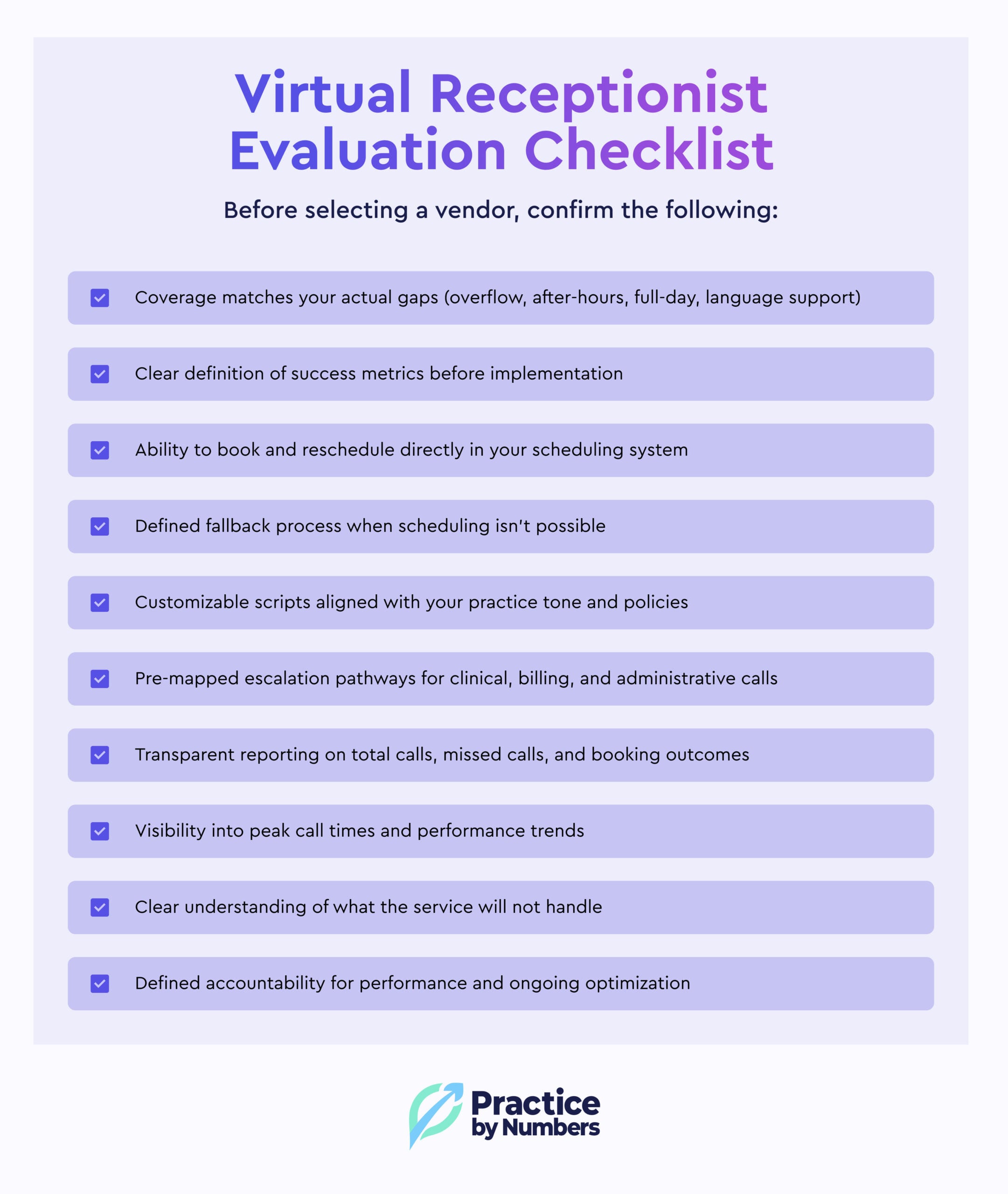
Before Selecting a Solution: Evaluation Checklist
Use this checklist to cut through the noise and evaluate any vendor with confidence.
1. Coverage
Not all coverage is created equal. Be specific about what gaps you’re actually trying to fill:
- Overflow only (when your lines are busy)?
- After-hours and weekends only?
- Full-time, all-day coverage?
- Do you need bilingual support, and if so, in which languages?
A solution that covers overflow but goes silent at 5 pm isn’t a solution. Partial coverage is just a more expensive gap.
2. Outcomes
Before evaluating a single vendor, decide what success looks like for your practice. Pick 2–3 outcomes that matter most:
- Fewer missed calls
- Higher appointment booking rate
- Faster speed-to-answer
- Better capture of new patients
Without a target, you can’t measure whether anything is working.
3. Scheduling Capability
This is where most vendors fall short. Dig past the sales pitch and ask the hard questions:
- Can they actually book appointments in your system or just take messages?
- Can they reschedule without creating conflicts or confusion?
- What’s the fallback when scheduling isn’t possible? (A text link? A callback queue? A warm transfer to your team?)
If the answer to any of these is vague, it might not be the right fit.
4. Script Control
Your patients should never feel like they’ve called a stranger. Find out how much control you have over:
- Greetings and tone
- Answers to your most common FAQs
- Clear rules around what your practice does and doesn’t handle
A good solution sounds like you. A bad one sounds like a call center.
5. Escalation Logic
Every call isn’t routine. Make sure the system has a clear, pre-agreed answer to:
- What counts as a clinical emergency?
- What routes to the office manager?
- What routes to billing vs. clinical staff?
Escalation without logic creates chaos. Map it out before you sign anything.
6. Reporting
This is non-negotiable. Any solution worth paying for should give you visibility into:
- Total call volume
- Missed call volume
- Peak call times
- Booked vs. lost opportunities
If a vendor can’t show you this data, you have no tangible insight in hand and are paying for the privilege. The best communication platforms treat measurement as a feature, not an afterthought.
Implementation: What Determines ROI
Most virtual receptionist underperformance is an implementation problem, not a product problem. The configuration work done upfront and the QA process in the first month determines whether the solution produces results or just adds cost.
Step 1: List Your Top 10 Call Reasons
Not departments. Not categories. Reasons. The actual words patients use when they call. The typical practice’s call volume breaks down to roughly the same ten things:
- New Appointment
- Reschedule
- Emergency
- Insurance
- Pricing
- Directions/Hours
- Records
- Billing
- Referrals
- “I Have a Question…”
Write these down before you configure anything. Every decision that follows depends on this list.
Step 2: Decide What Gets Handled vs. Escalated
This is the most important decision in the entire process, and it’s simpler than it sounds.
Apply one test: Is this call simple and repeatable or clinical, emotional, or high-stakes?
Directions and hours? Virtual handles it. A patient who thinks they’re having a reaction? That’s a human, immediately. The goal isn’t to automate everything, it’s to free your staff for the calls that actually need them.
Step 3: Set Service-Level Targets Before You Go Live
Three numbers give you a working baseline:
- Speed-to-answer: how fast calls are picked up
- Abandonment rate: how many callers hang up before anyone answers
- Booked rate on new patient calls: the one that ties directly to revenue
Healthcare benchmarks consistently show that speed-to-answer and call abandonment are among the most consequential operational metrics a practice can track. Set your targets before launch, so you’re measuring against something, not just watching numbers appear.
Step 4: Build a Missed-Call Recovery Workflow
Even with strong coverage, some calls will slip through. What happens next is what separates practices that lose patients from practices that don’t.
A simple recovery loop looks like this: an automated text goes out immediately (“Sorry we missed you. Here’s a link to book”), unresolved calls enter a callback queue, and every missed call gets a return call before the end of the day. This last step is the end-of-day reconciliation, the one most practices skip. It’s also the one that recovers the most revenue.
Step 5: QA Weekly for the First 30 Days
The first month is not “set it and forget it.” It’s the period where your ROI is actually built.
Listen to calls. Rewrite scripts that confuse patients. Update FAQs when the same question keeps coming up unanswered. Tighten escalation rules when edge cases surface. Thirty days of weekly QA will do more for your results than any feature the platform ships. This is where good implementations separate from average ones.
For a practical perspective on how virtual support gets implemented without compromising patient experience, see our Practice Pulse conversation with Dr. Aditi Agrawal and Rebecca Herring, where Rebecca outlines the operational approach her team uses to manage call handling as a back-office system rather than a front desk afterthought.
Getting This Right
Virtual reception is not a difficult concept, it’s a difficult execution. Practices that see strong results and practices that see marginal results are often using comparable technology. The difference is almost always in how the solution is set up, monitored, and managed over time.
Know if you’re actually ready before you buy
The most common readiness gap isn’t budget or technology. It’s internal clarity. If your team can’t clearly articulate your top call types, your scheduling rules, and your escalation thresholds, a virtual receptionist will expose that ambiguity immediately. Before evaluating vendors, document how your calls are currently handled, where the breakdowns occur, and what a resolved call looks like for each major category. Practices that do this work before selecting a solution configure faster, onboard more cleanly, and see results sooner.
The mistakes that kill ROI
The most common implementation failures follow a predictable pattern. Launching without baseline metrics means you can’t demonstrate improvement or identify what’s underperforming. Over-routing to virtual handling without proper escalation logic creates patient experience failures that show up in reviews before they show up in your reporting. Choosing a vendor based on price without verifying scheduling integration depth means you’ve paid for call answering but not for booking recovery, the more valuable outcome. And skipping the first-month QA process leaves script and routing problems in place long enough to establish bad patterns that are harder to fix later.
What ROI actually looks like
The return on virtual reception isn’t a single metric; it compounds across several. Answer rate improvements directly increase new patient bookings without additional marketing spend. Faster speed-to-answer reduces abandonment and improves first impressions for new callers. After-hours coverage captures urgent appointment requests that would otherwise go to a competitor who picks up. Front desk capacity relief reduces the overhead cost of overtime and turnover. Practices that measure all of these, not just call volume, consistently find that the total return exceeds what a single-metric analysis would suggest.
Ongoing management is what sustains results
Virtual reception degrades without maintenance. Scripts become outdated as procedures, pricing, and staff change. Escalation rules that worked at launch may not reflect current clinical protocols. New call types emerge that weren’t anticipated in the original configuration. A monthly review of call recordings, script performance, and routing accuracy is the minimum required to keep the system performing at the level it was designed for. Practices that assign clear ownership of this review, typically the office manager or practice administrator, maintain performance. Those that treat it as a set-and-forget system see gradual deterioration in outcomes over 3–6 months.
Missed calls are an access failure, and access directly affects patient acquisition, retention, and practice reputation. The technology to address it is available, proven, and increasingly affordable. What determines whether it works is the operational discipline applied to configuring it, measuring it, and managing it over time.