Open Dental is powerful and widely adopted precisely because it’s flexible. It lets practices run their own workflows rather than forcing a single system on everyone. That’s a genuine advantage until the practice gets busy. Then the flexibility becomes fragmentation.
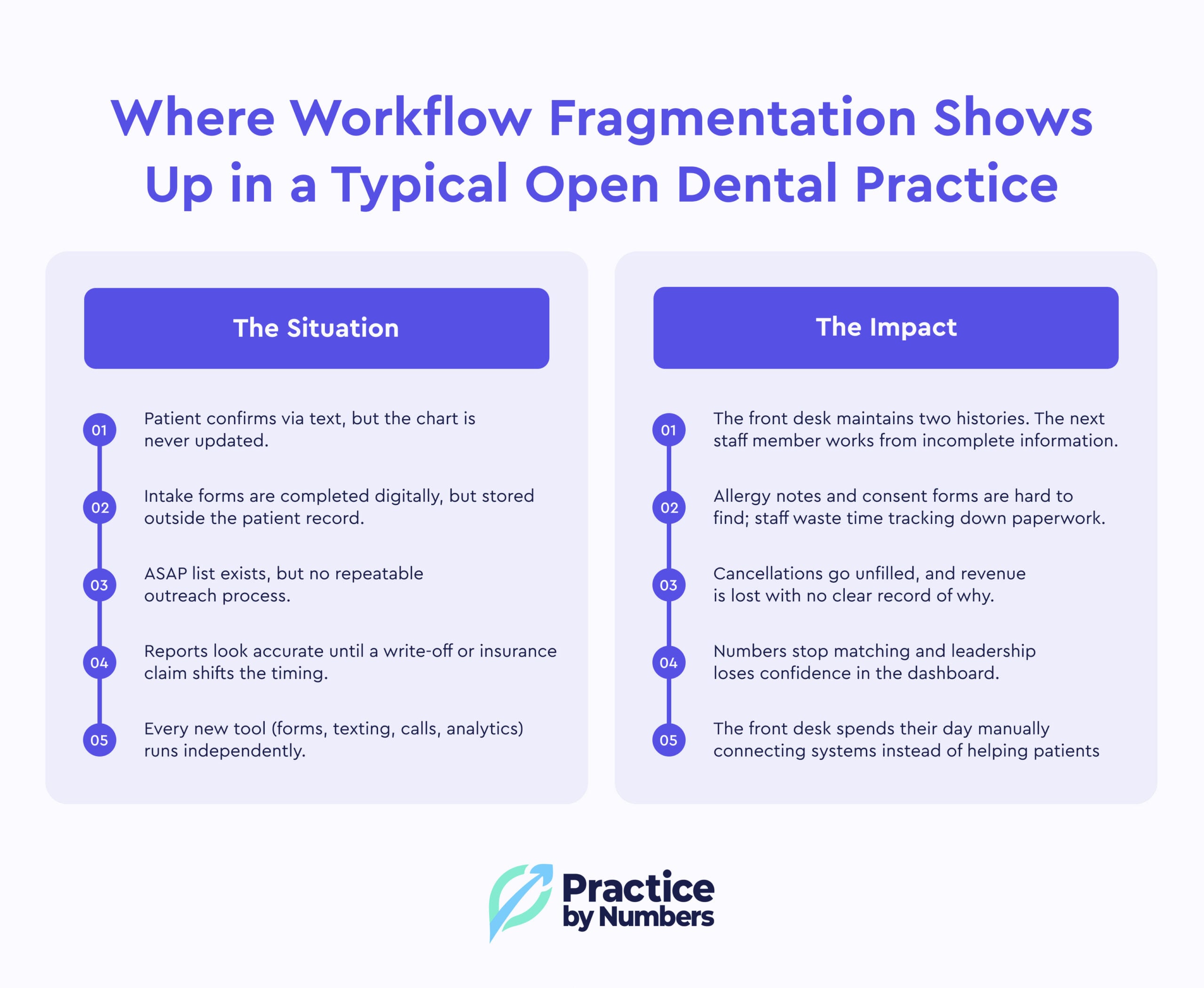
The problem isn’t Open Dental. It’s that the work starts happening in too many places, and the front desk ends up acting as the integration layer, copying, pasting, and re-entering details so the record stays complete.
This is where Practice by Numbers (PbN) earns its keep. Not as a replacement for Open Dental, but as the operations + growth layer on top of it. With bi-directional integration, PbN automates engagement and reporting workflows while writing key activity back into the PMS so Open Dental remains the system of record.
PbN supports Open Dental 15.4+, and PbN strongly recommends 20.1+ for its full engagement suite so you get the complete write-back and workflow experience.
This playbook focuses on the day-to-day operational moments where integration quality determines whether automation reduces workload or creates more of it.
What a Well-Integrated PbN Actually Does for Your Team
When texting software, digital forms, phone analytics, and dashboards operate independently, the front desk becomes the unofficial integration layer. Staff copies and pastes notes. They manually log conversations. They upload PDFs. They interpret patient responses. Over time, this manual bridging introduces inconsistency, delays, and data gaps.
A properly configured Open Dental + PbN integration aims to reverse that fragmentation.
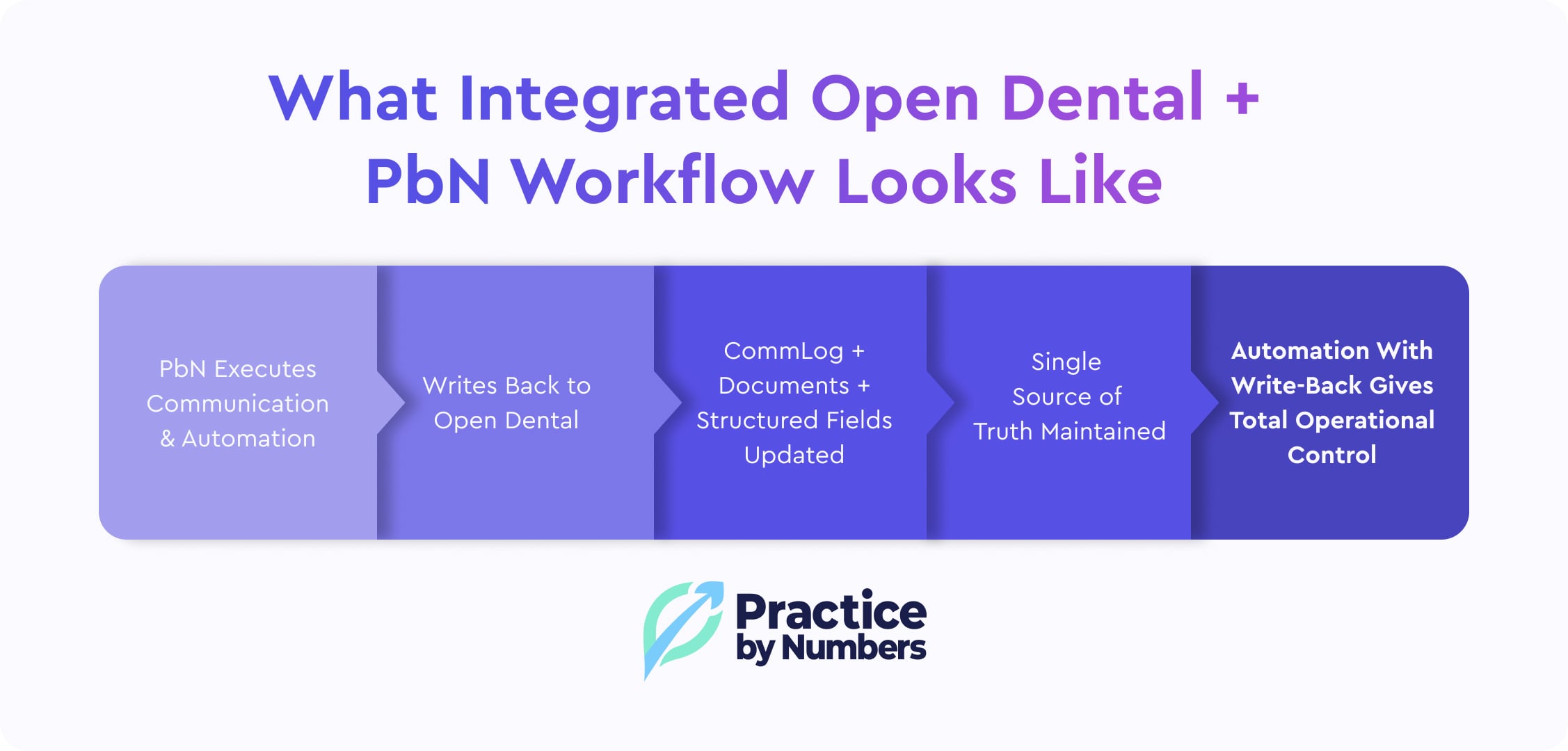
Open Dental remains the authoritative system for patient records, scheduling, financial data, and clinical documentation. PbN functions as the automation and visibility engine, executing communication campaigns, tracking engagement, and generating analytics while writing relevant activity back into Open Dental.
This distinction matters strategically. Automation without write-back creates parallel systems. Automation with structured write-back preserves discipline. The difference is whether your PMS remains complete even if you temporarily stop using the engagement platform.
Play #1: One Click from the Patient Chart to PbN
One of the most common reasons new platforms fail is behavioral resistance. Even when the software is powerful, teams resist switching between systems throughout the day. Every additional login or tab reduces adoption consistency.
PbN solves a big part of that for Open Dental practices with a dedicated PbN App Button that can launch the PbN Desktop App directly from the patient chart in Open Dental.
When automation tools are accessible directly within the chart:
- Your team stays anchored in Open Dental’s chart flow
- PbN becomes a “next step” inside the workflow, not a separate destination
- It reduces training friction because the entry point is familiar
If your goal is adoption, this small detail is a big deal.
Play #2: Every Patient Conversation Logs in the Open Dental Commlog Automatically
Open Dental’s CommLog is designed to function as a comprehensive communication history, acting as a log of all communications with a patient. It’s viewable from multiple parts of the software, like the Chart, the Appointment screen, and the Account tab, which makes it the right destination for writebacks.
PbN addresses this through configurable write-back settings that allow SMS messages, email logs, call logs, and notes to sync into Open Dental’s CommLog automatically.
The operational value is substantial:
- Your front desk stops maintaining “two histories” (one in the PMS, one in the engagement tool)
- When a patient calls, your team can immediately see recent reminders, responses, and prior outreach attempts within the chart
- If a team member is absent, the next person can pick up the thread without rework
Documentation becomes consistent rather than dependent on memory.
And if you turn PbN off tomorrow, would your Open Dental patient record still tell the full story? With CommLog writebacks configured properly, the answer should be YES.
Play #3: Digital Forms Land in the Chart, Not in a Folder
Open Dental has an Imaging Module that’s explicitly used to store documents and forms, including multi-page PDFs.
PbN’s writeback framework routes completed online forms back into Open Dental as documents within the patient record. This ensures consistent storage and eliminates printing, scanning, and manual uploading. The form is stored, searchable, and attached to the right patient record without manual work. No floating PDFs. No “did we get the consent?” at the chair. No digging through email attachments to find a health history update submitted two days ago. The more strategic opportunity lies in structured data mapping. This transforms intake from documentation into usable operational data.
So instead of:
- “Patient filled it out, but where is it?”
- “Can you print it, scan it, upload it, and label it?”
You get:
- A consistent, searchable document stored in the patient record workflow
The practical outcome is reduced manual interpretation. Staff no longer read through PDFs to extract actionable information. Instead, relevant responses already exist in structured form. This matters most in practices that have gone paperless in name but not in practice. The form delivery is digital, but the workflow still depends on someone manually bridging the gap between the form tool and the PMS. Writeback closes that gap.
Play #4: More Data Visibility With Custom Data Sources
This is where the Open Dental integration gets uniquely powerful.
PbN supports Custom Data Sources for Open Dental, which allows patient responses from certain form fields (Yes/No questions and radio buttons) to write back directly into those structured PMS fields, not into a PDF, not into a note, but into an actual data field your team can use.
Open Dental itself supports custom patient fields, which are tied to field names and can be edited/managed.
So, instead of intake being a PDF you have to interpret, you can map certain responses into fields your team can actually use without retyping.
Common examples of what practices map through Custom Data Sources:
- “Preferred language”
- “Has medical condition: yes/no”
- “Consent acknowledged”
- “Interested in whitening / Invisalign / implants: yes/no”
- “Best contact method”
- “Ok to text: yes/no”
What makes this significant is that structured fields enable automation and reporting in ways that documents cannot. A PDF that says “interested in whitening: yes” doesn’t trigger anything. A structured field that says the same thing can segment that patient, trigger a campaign, flag a conversation for the provider, or populate a report. The data becomes actionable rather than archival. Any response that your team would otherwise read from a form and manually enter somewhere becomes a field that writes itself.
Play #5: Online Booking That Respects Your Scheduling Rules
Online booking can either reduce front desk workload or create daily cleanup tasks. The determining factor is whether it respects the internal logic of your schedule.
Open Dental supports Blockout/time constructs, used to reserve time for certain procedures, providers, or operational rules. These blockouts define how chair time is allocated and how appointment types should be distributed.
PbN’s Online Booking settings include controls tied to blocks that are built to read and respect those Open Dental blockout rules, so patients can only book into slots that are actually valid: the right provider, the right chair, the right appointment type, within the blocks your schedule defines.
PbN’s support documentation also notes Open Dental-specific behavior around how blocks are interpreted for online booking availability.
- Patients book valid slots
- Your team doesn’t spend mornings “fixing the schedule”
- You can confidently promote booking links
If you’re evaluating online booking, this is the detail worth testing in a demo: can the tool see your blockout structure, and does the patient-facing booking experience reflect it accurately? Online booking should increase access without sacrificing operational control.
Play #6: Activating the ASAP List as a Revenue Tool
Open Dental’s ASAP List is designed to identify patients who want to be seen sooner and notify them quickly when openings appear. In theory, it supports cancellation recovery. It’s a useful concept, and Open Dental notes that appointments can be scheduled from it. The limitation is not the list itself. It is the absence of structured outreach tied to it.
PbN takes that concept further by letting you build outreach around it. PbN’s Revenue IQ documentation explains how practices can add patients to the ASAP list in their PMS and then use Revenue IQ campaigns to target those ASAP patients to fill last-minute openings.
The ASAP list is only valuable if it drives consistent action. With PbN, the ASAP list can become:
- A repeatable process for filling cancellations
- A segment that triggers outreach automatically
- A measurable workflow (who contacted, what worked, what filled)
This is one of the cleanest “quick win” integration use cases for Open Dental practices because it ties a built-in OD workflow to a scalable engagement engine.
Play #7: Financial Reporting That Matches Open Dental Math
If you want leadership trust in analytics, you need reconciliation. Not “directionally accurate” but actually aligned with the rules your PMS uses.
Open Dental explicitly documents the write-off reporting behavior tied to the setting:
“Use initial claim date for write-off estimates, insurance payment date for write-off adjustments.”
PbN’s Open Dental best-practice documentation states that when calculating adjusted production, PbN uses that same setting and instructs practices to confirm the option is selected in Open Dental when running comparison reports. If your adjusted production numbers look off, this setting is usually the first place to check.
In short, if your adjusted production looks off, it’s usually not an analytics bug, it’s a rules mismatch. A good integration doesn’t ignore that, it documents how to align it.
Practices must verify:
- The correct write-off setting is enabled in Open Dental.
- Reports are run using consistent parameters.
- Adjustment categories are structured logically.
Reconciliation builds leadership trust. Leadership trust drives adoption. Without alignment, analytics feel abstract. With alignment, they become decision-grade.
Treatment Plans and KPI Accuracy
Open Dental supports multiple treatment plan statuses, including Active and Saved plans. Saved Treatment Plans preserve fee information at the time of saving and help track accepted treatment.
PbN’s Open Dental guidance also addresses multi-plan workflows, making the recommended plan “Active” and additional plans “Saved” to ensure dollars are included properly in KPIs like Treatment Presented.
If you want accurate treatment presented, case acceptance trends, patient portions, and insurance estimates, you need consistent treatment plan discipline in Open Dental. PbN doesn’t just “pull treatment plans,” it expects Open Dental to be used in a way that preserves truth.
When teams follow clear treatment plan protocols, analytics become reliable indicators of growth opportunity and case acceptance trends. Data quality begins at the point of entry.
Data Sync and Security: What to Know
PbN’s help center states that it uses a lightweight server program to retrieve and encrypt practice data, transmits it to a HIPAA-compliant cloud server, and that dashboards sync approximately every ~3 hours. Another PbN support page states dashboards sync approximately every ~2 hours throughout the day, frequent enough to support operational visibility without requiring a live connection to your practice management system.
The exact sync cadence may vary depending on configuration or the specific module in use, but the overall experience is near-real-time for day-to-day decision-making.
On the question of HIPAA compliance, HHS guidance is clear: cloud computing is fully permissible under HIPAA when the appropriate safeguards and business associate responsibilities are properly established and maintained.
Why the Open Dental + PbN Integration Makes Operational Sense
For Open Dental practices, the value of PbN is not that it adds another dashboard. It is that it reduces operational overhead while preserving system-of-record discipline.
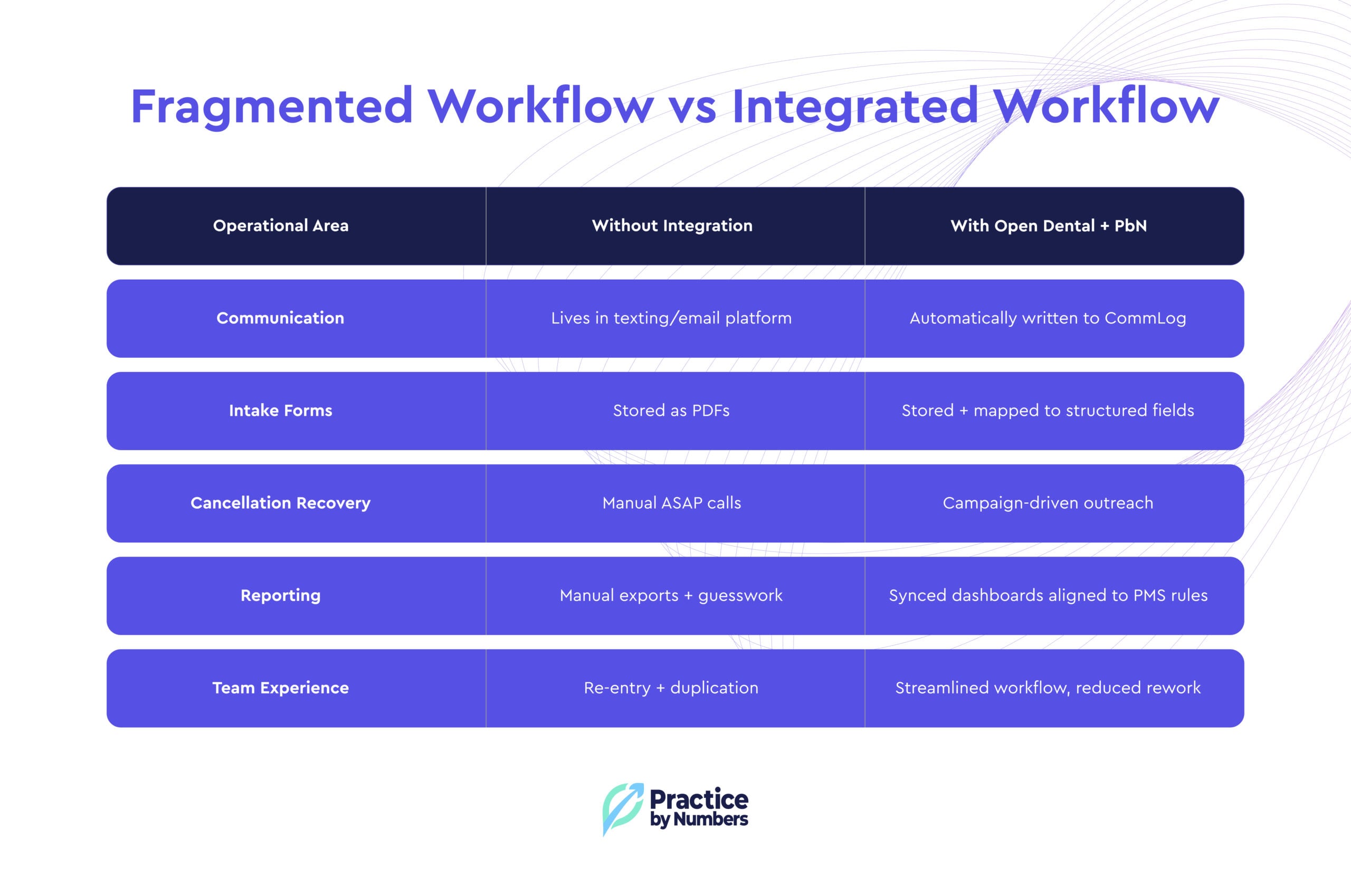
When configured properly, the integration can:
- Eliminate duplicate communication logging
- Convert digital intake into structured, usable data
- Respect the scheduling architecture in online booking
- Activate the ASAP list as a measurable revenue tool
- Align financial analytics with Open Dental’s reporting logic
Open Dental provides flexibility and depth. PbN adds structured automation and visibility.
Together, when implemented with configuration discipline, they can reduce manual effort, improve reporting confidence, and strengthen execution consistency without compromising the integrity of your PMS.